If you have come across CapCut Beta while searching for a newer version of CapCut, browsing editing tutorials, using an iPad, or reading discussions about upcoming tools, you may be wondering what the term actually means. The word “Beta” sounds straightforward, but the reality is more complicated because it does not necessarily refer to one universal CapCut application that works the same way on every device.
At its simplest, this versions refers to a CapCut product, build, feature set, or platform experience that is still being tested, refined, or prepared for a broader release. That can involve interface changes, new editing workflows, performance improvements, experimental functions, temporary access arrangements, or features that may later change before becoming part of a stable release.
One of the clearest current examples is CapCut’s dedicated iPad experience. CapCut officially states that its dedicated iPad application is still in Beta development. According to the company, the product is being refined while CapCut tests features, improves performance, and collects feedback from users. CapCut also currently makes selected Standard and Pro features temporarily available free on the iPad version during this testing period.
That does not mean every person who downloads or encounters Beta receives CapCut Pro for free. It also does not mean every Beta build contains identical functionality. Platform, app version, account eligibility, region, device type, and rollout timing can influence what a user actually sees.
The most important distinction to understand from the beginning is this:
Beta describes the development status of software, while Pro describes a premium access tier.
These concepts can overlap, but they are not interchangeable.
This guide explains what CapCut’s Beta environment means in practical terms, how it differs from the stable version of CapCut, how platform availability can vary, what happens with temporarily free premium features, what risks Beta software can introduce, how creators can protect important projects, and how to decide whether testing-stage software belongs in a personal or professional editing workflow.
The goal is not to convince every reader to install beta version of capcut. Instead, the goal is to give you enough reliable context to decide whether using it makes sense for the type of editing you actually do.
Information checked in August 2026: CapCut changes quickly. Features, subscription options, AI usage rules, credit requirements, platform availability, interfaces, and Beta programs can change after publication. Always confirm current details through CapCut’s official channels before making changes to an important production setup.
What Is CapCut Beta and What Does Beta Actually Mean?
Understanding CapCut Beta becomes much easier once you understand why software companies release Beta products in the first place.
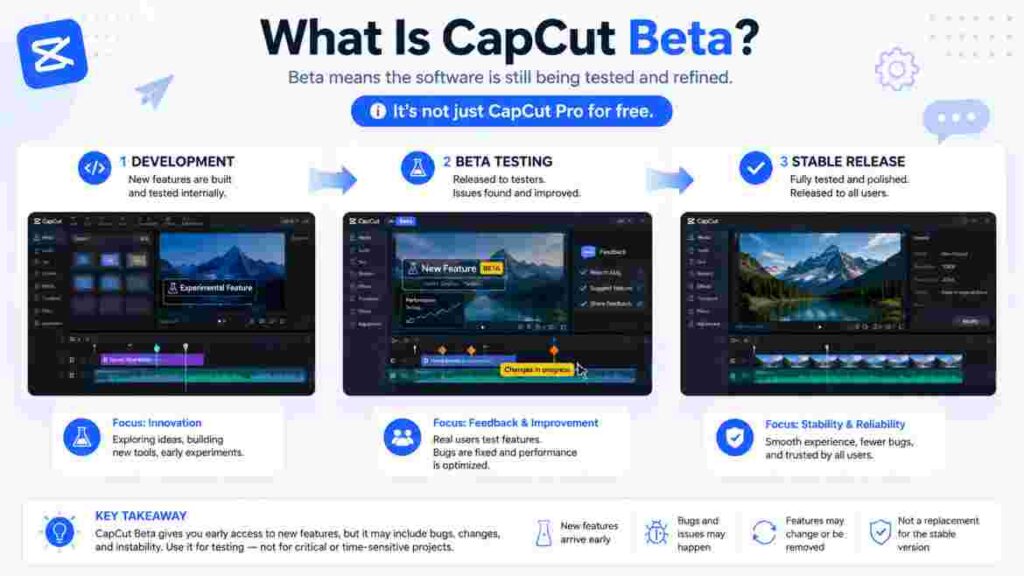
Modern applications are rarely developed as finished products behind closed doors and then released without further testing. Developers usually build features in stages. Internal testing may come first, followed by limited testing, wider Beta access, and eventually a stable release when the company believes the experience is suitable for broader use.
A Beta version is generally functional enough to use but still undergoing active testing or refinement.
That distinction is especially important for video-editing software. Video editors interact with different hardware configurations, codecs, project sizes, operating systems, display environments, online services, artificial intelligence systems, audio formats, cloud-storage services, and export settings. A feature that performs perfectly on one device may behave differently on another.
Beta testing gives developers more opportunities to identify these differences before treating a product as fully established.
How a Beta Version Differs From a Stable Release
A stable application is intended to be the normal production version for a broad audience. That does not mean stable software can never contain bugs. Complex applications receive updates precisely because problems are discovered after release.
The difference is primarily one of expectations.
When you install the stable version of CapCut, you reasonably expect the core workflow to remain reasonably predictable. Buttons may move after major updates and new features may appear, but the application is being presented as the mainstream production version.
When you use it, you should expect more change.
A feature may be redesigned. A control may move. An experimental workflow may disappear. A tool that is free during testing may later require payment. Performance may improve after one update and behave differently after another. A feature might also be limited to particular accounts or platforms while CapCut evaluates how users respond to it.
Those possibilities are not evidence that Beta software is poor quality. They are part of what Beta testing is designed to uncover.
Why CapCut Needs Real-World Beta Testing
Video-editing applications are technically demanding.
A typical editor may need to play multiple video streams, decode compressed footage, display animated graphics, process audio, generate captions, handle color adjustments, render effects, track motion, communicate with cloud services, save project information, and generate final exports.
AI has made the situation even more complex.
Some modern CapCut functions may depend on remote computing rather than running exclusively on the local device. This can introduce additional variables such as network speed, server availability, account permissions, credits, subscription limits, regional availability, and processing capacity.
A CapCut Beta environment allows some of these systems to be evaluated under real-world conditions before every detail is finalized.
Why Two Users May See Different Beta Experiences
One of the biggest mistakes people make when researching Beta software is assuming that someone else’s screenshots represent exactly what they will receive.
That is not always the case.
Two creators can both use CapCut and still see differences because they may be using different:
- operating systems;
- devices;
- regions;
- accounts;
- subscription tiers;
- application versions;
- rollout groups;
- interface experiments.
CapCut’s own support documentation notes that the company releases updates across mobile, desktop, and web and that interface locations can change after updates.
This is why articles claiming to show a permanent list of every Beta feature should be treated cautiously. A Beta feature list can become outdated much faster than a guide explaining the underlying workflow.
Is CapCut Beta an Official CapCut Product?
Official Beta experiences do exist.
The strongest current evidence comes directly from CapCut’s Help Center, where the company identifies its dedicated iPad product as being in Beta development. CapCut says the reason the dedicated iPad application is currently unavailable in the US App Store is that the product is still being polished before its full official launch.
However, the existence of an official CapCut Beta does not mean every file on the internet containing the word “Beta” is legitimate.
This distinction matters because searches for video-editing applications often return third-party APK downloads, unofficial installers, modified applications, and pages promising “unlocked” premium functionality.
Official Beta Software and Modified Software Are Different Things
An official Beta is software released, distributed, or recognized by the developer through legitimate channels.
A modified application is a version that someone outside the official development process has changed or repackaged.
Those two things should never be treated as equivalent.
An official Beta may contain unfinished functions or temporary bugs because it is still being tested. A modified application introduces a completely different problem: you may not know what was changed, who changed it, or what the software is doing behind the scenes.
If a website promises an unofficial CapCut Beta version that includes permanent Pro access, unlimited AI credits, premium templates forever, or other paid functionality without authorization, that is not a normal benefit of software testing.
Why Third-Party Beta Downloads Create Additional Risk
When you install software from an unverified source, you may not know whether the file is identical to the official application.
Possible concerns include altered code, modified account handling, bundled software, fake update mechanisms, removed security protections, or malware.
That risk is especially important for creators because video-editing applications may have access to valuable media.
A professional editor could have:
Complete client footage;
Unreleased campaign materials;
Personal photos;
Voice recordings;
All brand assets;
Complete business documents;
or paid project files stored on the same device.
Avoiding unknown installers is therefore not merely a technical preference. It is sensible production hygiene.
How to Verify Whether a Beta Download Is Legitimate
Start with official distribution.
Check CapCut’s own website, CapCut’s Help Center, and the official application store for your operating system.
Then confirm what your current version already offers.
If CapCut officially provides access to a particular Beta experience, follow the instructions associated with that program.
Do not assume that you need to download an APK, IPA, DMG, or Windows installer from an unrelated website simply because a search result uses the words Beta.
The safer principle is simple:
Verify first, install second.
Where Is CapCut Beta Available in 2026?
Platform availability is one of the most confusing parts of this topic because CapCut does not necessarily treat every operating system the same way.
The dedicated tablet experience demonstrates this clearly. CapCut’s current iPad product is still under Beta development, while its established mobile and desktop products follow their existing release and pricing structures.
Android tablets have also received a dedicated CapCut Pad experience. Technology reporting in May 2026 documented a Beta notice for professional editing in the Android tablet application and noted that many Pro functions were temporarily available during this stage.
These examples show why platform-specific guidance matters.

CapCut Beta on iPad
The dedicated iPad experience is currently the best documented Beta case.
CapCut says the product is designed to provide a more advanced editing experience than the standard mobile application. The iPad version supports workflows such as multi-track editing, multiple media selections, greater control over layers and timing, and projects involving larger amounts of footage.
The company is still refining this experience.
That means Beta Version of CapCut on iPad should not be thought of as simply the iPhone version stretched onto a bigger screen. CapCut positions the iPad product as a more complex editing environment designed around tablet workflows.
CapCut Beta Availability in the United States
US readers need to pay particular attention to availability.
CapCut currently states that its dedicated iPad application is still under Beta development and is not available in the US App Store. CapCut recommends using the web version on iPad as an alternative for US users.
This is a good example of why search tutorials can become misleading.
Someone in the United Kingdom, Canada, Australia, Europe, or another supported region may see an App Store listing that a US user cannot access.
That does not necessarily mean anything is wrong with the US user’s device.
Regional distribution rules can simply differ.
CapCut Beta on Android Tablets
CapCut has also expanded into a dedicated Android tablet experience.
Reporting on CapCut Pad in 2026 described an interface designed around a larger workspace, tablet-oriented controls, expanded timeline space, and a Beta notice for professional editing. The report also noted that compatibility can vary between Android tablets.
This is useful for Android users because it highlights another important distinction:
hardware compatibility is not the same as operating-system compatibility.
Two devices can both run Android but have very different processors, memory, graphics capabilities, screen sizes, and software configurations.
A tablet application that runs well on one model may not yet be supported on another.
CapCut Beta on Windows
Desktop users sometimes encounter references to Beta builds in community discussions, release notes, or tutorials. However, there is no responsible reason to assume that every Windows user can or should install the same testing build.
If you are looking for CapCut Beta on Windows, begin by checking the version currently installed on your machine.
Then determine what you actually want from the Beta.
Are you looking for a specific editing feature?
Are you trying to solve a compatibility problem?
Did someone send you a project that requires a newer release?
Or are you simply assuming Beta means “the best CapCut”?
These situations require different decisions.
If your stable desktop version already supports your workflow, moving to testing software may provide little practical benefit.
CapCut Beta on macOS
The same logic applies to macOS.
A Mac-specific Beta can behave differently from its Windows counterpart because the operating system, hardware architecture, graphics pipeline, permissions, and media frameworks are different.
If you test a newer CapCut build on macOS, record both your CapCut version and your macOS version.
That information becomes particularly valuable if a project stops opening, the timeline becomes sluggish, or an export begins behaving differently after an update.
CapCut Beta on Android Phones
Android phone users often see search results for “CapCut beta APK,” but that phrase alone does not establish authenticity.
An APK is simply an Android application package.
Official Android applications are packaged as APKs too, but that does not make an APK found on an unrelated download website official.
If a legitimate testing option appears through Google’s normal ecosystem or through CapCut’s own official distribution channels, follow those instructions.
Otherwise, use the mainstream application rather than treating an unofficial file as the equivalent of CapCut Beta.
CapCut Beta on iPhone
iPhone users should make a similar distinction.
The normal iPhone application receives regular App Store updates. A new update is not automatically a Beta.
If you see a tutorial describing an iOS Beta installation, check:
when the tutorial was published;
which country it applies to;
which CapCut version it demonstrates;
and whether the distribution method is still official.
Beta availability can change faster than a normal video-editing tutorial.
Does CapCut Beta Exist on the Web?
Web applications work differently from installed desktop or mobile applications.
CapCut can modify web functionality on its servers without asking users to download a traditional program update.
As a result, a new feature appearing online does not necessarily mean the entire web application has entered a Beta stage.
This is why you should distinguish between:
a new feature;
an experimental feature;
a staged rollout;
a dedicated Beta application;
and an ordinary update.
They may be connected, but they are not identical concepts.
How to Get CapCut Beta Safely Without Risking Your Main Workflow
The safest way to approach CapCut Beta is not to start with a download button.
Start by identifying your reason for wanting it.
Software testing makes sense when the potential benefit is clear. If you do not know what you are trying to gain, there is little reason to disrupt a working editing environment.
Decide What You Actually Want From the Beta
Suppose you watched a creator demonstrate a new AI workflow.
You might assume you need Beta.
Before changing anything, check whether your current version already contains the same tool.
Feature rollouts can happen gradually, and tutorials can be recorded on different platforms.
Another possibility is that you want free Pro tools.
That is not a good reason to treat CapCut Beta as a permanent alternative to CapCut Pro because temporary premium access can change.
The most useful reason for Beta testing is:
there is a specific new workflow or feature you want to evaluate.
Record Your Current CapCut Version
Before making changes, write down your current application version.
Take a screenshot if that is easier.
Also record the operating system version if you are working on a computer or tablet.
If something stops working after the update, this baseline tells you exactly what changed.
Without a baseline, users often say:
“It worked before.”
That is much less useful than:
“It worked in version X but stopped after version Y.”
Check Official Availability Before Downloading Anything
CapCut’s own documentation should be your first reference point.
If an official CapCut Beta opportunity exists for your platform, use the route CapCut provides.
If it does not appear on your device, do not immediately assume a third-party installer is the solution.
The test may simply not be available to your account, hardware, or region.
Protect Important Project Files
This is one of the most important steps.
Beta software should never be treated as an excuse to ignore project hygiene.
Keep original video clips, audio, images, logos, graphics, voiceovers, and essential documents organized separately from the editing application.
Your source media is your insurance policy.
Even if an editing project becomes unusable, correctly organized original assets make rebuilding possible.
Avoid Updating During a Critical Deadline
Imagine you have a client delivery tomorrow morning.
Your existing version works.
A new Beta promises a faster captioning workflow.
This is not the ideal moment to redesign your editing environment.
The time saved by one new feature can easily be lost if:
the interface changes;
a project does not reopen;
the preview becomes slower;
an asset becomes unavailable;
or export behavior changes.
Test CapCut Beta when the cost of failure is low.
Create a Test Project First
A good Beta test should represent your real workflow.
Do more than simply launch the application.
- Import footage.
- Create a short edit.
- Add the type of text, audio, and media you normally use.
- Save the project.
- Close the application.
- Reopen it.
- Continue editing.
- Export a sample.
- Then play the exported file outside CapCut.
That sequence gives you much better evidence than opening the application for two minutes and deciding that everything looks fine.
What Features Can Be Different in CapCut Beta?
It would be tempting to create a list called “25 CapCut Beta Features,” but that would be one of the weakest ways to cover this topic.
A Beta feature list is inherently temporary.
The more useful question is:
What categories of functionality can change while CapCut is testing a product?
Interface and Workspace Changes
One of the most visible differences can be interface design.
Buttons may move.
Menus may become more compact.
Tablet controls may be redesigned around touch interaction.
Desktop tools may be reorganized to make room for new functionality.
CapCut’s iPad experience already demonstrates this philosophy because the company positions it as a more advanced editing environment with expanded multi-track control rather than simply duplicating its mobile interface.
When using CapCut Beta, interface changes should therefore be expected rather than treated as evidence that something is necessarily broken.
New Editing Workflows
A Beta may introduce new ways of completing familiar tasks.
The important question is not whether the workflow looks impressive.
It is whether it actually improves your editing.
A new workflow is valuable when it makes a task:
faster;
more controllable;
more accurate;
or easier to repeat.
If it requires more cleanup or introduces additional steps, the older stable workflow may still be better.
AI-Powered Tools and Experimental Automation
AI functionality is particularly likely to change because these systems depend on more than the local application.
An AI feature may rely on:
- remote computing;
- account limits;
- regional availability;
- subscription entitlements;
- credits;
- server load;
- model updates;
- or content restrictions.
As a result, one creator’s Beta AI experience may differ from another’s even if both appear to use a similar interface.
Performance Improvements and Performance Regressions
Beta testing is not always about visible features.
CapCut specifically says it uses the iPad Beta phase to optimize performance and improve the product.
That is important because a Beta can contain performance work that users do not immediately notice.
At the same time, changing software can expose new hardware-specific problems.
An update may improve playback on one machine while creating a different issue on another.
That is why anecdotal reports should not be treated as universal facts.
Temporary Premium Access
This is currently one of the most important CapCut Beta differences.
CapCut says selected Standard and Pro features are temporarily available free in its dedicated iPad product while the application remains in Beta. The company describes this as a limited-time trial designed to let users explore advanced tools while development continues.
That does not mean those features have permanently moved into the free tier.
It means CapCut is temporarily handling access differently during testing.
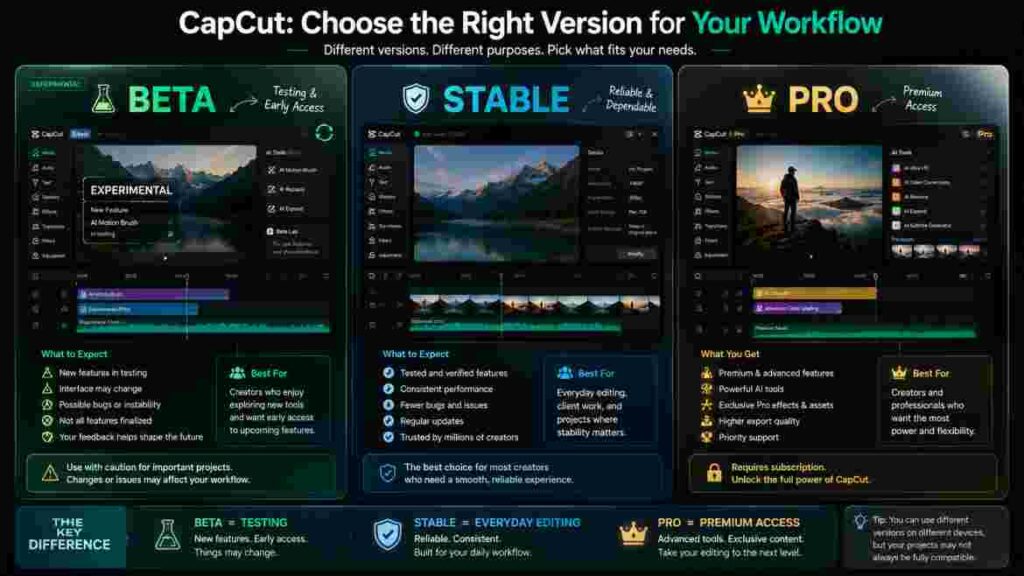
CapCut Beta vs Regular CapCut: Which One Makes More Sense?
The choice between Beta and stable CapCut should be based on workflow needs rather than excitement.
| Factor | CapCut Beta | Stable CapCut |
|---|---|---|
| Primary purpose | Testing newer or changing functionality | Everyday production editing |
| Interface consistency | May change during development | Usually more established |
| Feature availability | Can vary between tests and platforms | More predictable |
| Pricing behavior | May include temporary testing access | Normal Free/Standard/Pro rules |
| Project risk tolerance | Better for experimentation | Better for important workflows |
| Best suited to | Testers and early adopters | Most everyday creators |
| Update behavior | Changes may be more noticeable | Mainstream release cycle |
| Long-term predictability | Lower | Higher |
Why Stable CapCut Is Better for Many Beginners
Beginners usually do not need experimental functionality.
A new editor already has a substantial amount to learn, including pacing, trimming, story structure, audio balance, framing, captions, visual hierarchy, aspect ratios, and export settings.
Adding a changing interface can create unnecessary confusion.
Learning stable CapCut first gives you a reference point.
Later, when you try, you can identify what has actually changed because you understand the normal workflow.
Why Experienced Users May Benefit More From Beta
An experienced CapCut user may have a stronger reason to test new workflows.
They already know how the editor normally behaves.
That makes it easier to evaluate whether an experimental feature:
saves time;
creates better output;
reduces manual work;
or simply adds novelty.
Experienced users also tend to understand version management and project backups better, which can reduce the consequences of testing.
Why Professional Editors May Still Prefer Stable CapCut
Professional experience does not automatically make Beta the better choice.
In fact, professionals often value predictability more than beginners.
A freelancer producing five paid videos every week cannot afford to lose several hours because a workflow changed unexpectedly.
For production work, stability itself has commercial value.
If the stable version already delivers the result the client needs, introducing Beta Version without a specific production benefit may create unnecessary risk.
CapCut Beta vs CapCut Pro: Understanding the Difference
The phrase “Beta” and the word “Pro” describe two completely different ideas.
CapCut Beta describes testing status.
CapCut Pro describes premium access.
This distinction is critical because many users encounter Beta precisely when searching for ways to access premium tools.
Why Some Beta Users Get Premium Features Free
The dedicated iPad application currently provides the clearest explanation.
CapCut says selected Standard and Pro features are temporarily available free during Beta so users can explore and test advanced functionality.
CapCut also says some features that require credits or premium access on other platforms may appear free on iPad during this Beta period.
That is a temporary product-testing arrangement.
It should not be interpreted as:
“CapCut has made Pro free forever.”
Does CapCut Beta Replace CapCut Pro?
No.
If you need dependable long-term access to premium functionality, a temporary Beta offer should not be treated as equivalent to a subscription.
Suppose an AI tool becomes central to your weekly workflow.
If that tool is currently free only because the platform is under Beta testing, you should ask whether the workflow would still make financial sense if CapCut moves the feature into a paid tier later.
That question is especially important for businesses.
Why the Subscription Page May Look Different on iPad
CapCut says subscription-related functions are not yet fully available or visible inside its dedicated iPad product because the version remains in Beta. Users who want Pro can still subscribe through supported alternatives such as CapCut Web, mobile, or desktop and then sign in with the same account on supported platforms.
This provides another useful lesson.
A missing subscription button does not mean the subscription no longer exists.
Interface development and account entitlement are separate things.
Is CapCut Beta Free or Will You Eventually Need to Pay?
This question requires a more nuanced answer than simply saying yes or no.
Access to CapCut Beta itself may not require a special Beta payment in some contexts, but the individual features inside CapCut can follow different rules.
CapCut currently offers selected premium features temporarily free on its dedicated iPad Beta.
However, CapCut explicitly says this access may not remain free after the product leaves Beta.
Why Temporary Free Access Exists
Beta testing becomes more useful when users actually try the features being tested.
If advanced tools remain locked behind normal restrictions during an early product stage, fewer testers may experience those functions.
Temporary access gives CapCut more real-world feedback.
From the user’s perspective, this can be beneficial because it provides an opportunity to evaluate advanced features before deciding whether they are valuable.
But the correct mental model is:
temporary trial access, not permanent ownership.
Why Free Usage Limits Can Differ
Some features are more computationally expensive than others.
AI processing is a good example.
Generating or transforming media can require far more server resources than a simple local adjustment.
Because of this, free usage limits can vary between tools and may change during testing.
Do not build a guide around a permanent claim such as:
“Every Beta user gets exactly X free generations.”
Numbers like that can become inaccurate quickly.
What Happens After Beta Ends?
CapCut has not promised that every temporarily free feature will remain free.
Its current documentation says the iPad product may eventually move toward pricing and feature-access models that align more closely with other CapCut platforms.
Users should therefore avoid basing long-term financial decisions on temporary Beta conditions.
The Main Benefits of Using CapCut Beta
The benefits of Beta software become clearer when they are connected to practical goals.
Earlier Exposure to New Workflows
A creator who follows software changes closely may benefit from learning new tools before they reach a broader audience.
This can be particularly useful for:
CapCut educators;
tutorial creators;
social-media professionals;
workflow consultants;
and creators who frequently experiment with new production methods.
Early access gives these users time to understand what is changing.
A Chance to Test Whether a New Feature Actually Saves Time
Marketing descriptions rarely tell you how useful a tool will be for your own projects.
Testing does.
Suppose Beta version introduces a workflow designed to automate part of your editing process.
The right way to evaluate it is to compare it with your current workflow.
Measure:
how long the original method takes;
how long the new method takes;
how much correction is needed;
how consistent the results are;
and whether you retain enough creative control.
A feature is valuable when it improves the overall process, not merely when it performs one step quickly.
Temporary Access Can Help With Purchasing Decisions
The current iPad Beta gives users an opportunity to try selected premium functions before the final commercial model is fully established.
That can help answer an important question:
Would I actually pay for this feature if it becomes premium?
Trying a feature in real projects provides a better answer than reading a feature list.
Beta Feedback Can Improve the Product
CapCut encourages users of its current Beta tablet experience to provide feedback, including descriptions and screenshots or recordings when appropriate.
Good feedback can help developers understand problems they may not reproduce internally.
Useful feedback explains:
what happened;
what should have happened;
which device was used;
which version was installed;
whether the problem repeats;
and which project conditions trigger it.
The Main Risks and Limitations of CapCut Beta
The advantage of newer functionality comes with additional uncertainty.
That does not mean something will go wrong.
It means you should think about what happens if it does.
Bugs May Appear in Specific Workflows
Testing-stage software can contain problems that do not appear until users work with unusual combinations of footage, effects, hardware, or projects.
One creator may edit successfully for weeks while another encounters a bug involving a particular codec or feature.
This is why you should avoid statements such as:
“CapCut Beta is unstable.”
That is too broad.
A more accurate statement is:
testing-stage builds can expose bugs that may vary by version, hardware, and workflow.
Performance Can Change Between Updates
Video editing is resource-intensive.
Timeline playback can be affected by: resolution; codec; frame rate; number of tracks; effects; background applications; available memory; storage speed; GPU performance; thermal conditions; and project complexity.
If Beta version feels slower after an update, the update may be involved, but it should not automatically be blamed.
A structured test is more useful.
Open a lightweight project.
Compare it with the large project.
If the lightweight project runs normally, complexity may be part of the issue.
If every project suddenly becomes slower after the same update, the version change becomes a stronger suspect.
Features May Move or Disappear
Beta functionality is not guaranteed to remain identical.
A control may move into another menu.
A tool may be renamed.
A test may end.
A feature may become available only to another rollout group.
A feature may also be redesigned before wider release.
Creators publishing tutorials about CapCut Beta should therefore include the version and date of the tutorial whenever possible.
Temporary Premium Access Can End
This is one of the clearest known limitations.
CapCut specifically says premium features that are temporarily free during the iPad Beta may later become part of paid plans.
If you rely heavily on one of those tools, prepare for the possibility that its access conditions will change.
Project Compatibility Can Become Complicated
Editing projects can contain information tied to specific application features.
A newer version may understand older project structures.
An older version may not understand every element saved by a newer release.
This creates a practical risk when attempting to downgrade.
Do not assume that a project opened and saved in CapCut Beta will automatically behave exactly the same way in an older stable version.
Team Workflows Can Become Inconsistent
If multiple editors collaborate, version differences become more important.
One editor may use Beta while another uses stable CapCut.
If the Beta user introduces a feature unavailable in the stable version, project sharing may become less predictable.
Teams should therefore standardize their editing environment before starting important collaborative work.
Seven Things You Should Do Before Installing CapCut Beta
Preparation turns Beta testing from random experimentation into controlled testing.
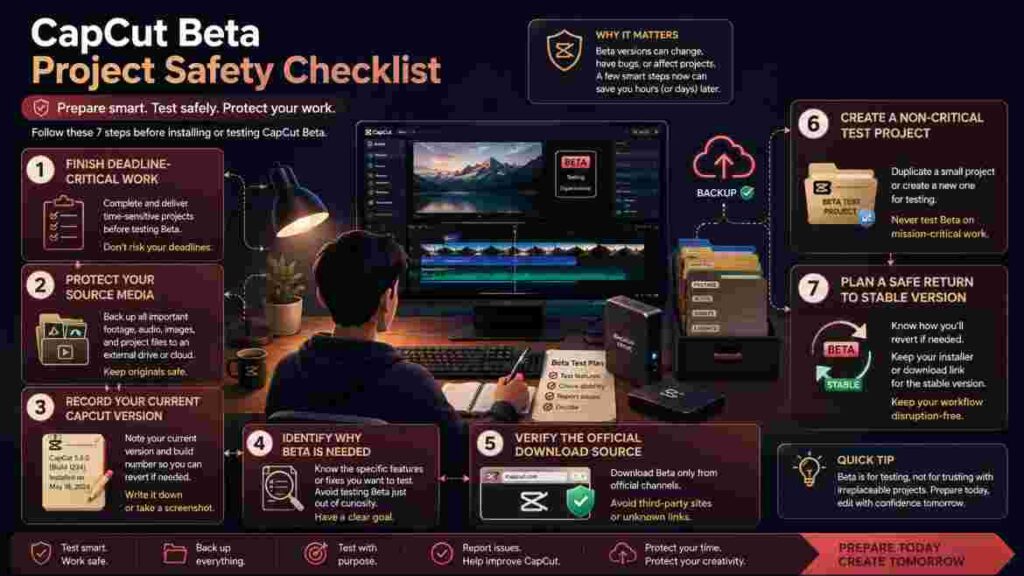
Finish Deadline-Critical Projects Before Updating
If a project is nearly finished, complete it before changing the software environment unless the update is necessary to solve a specific problem.
A working editing setup is valuable.
Do not discard that stability merely because a new version is available.
Keep Original Media Organized and Protected
Your project file should never be the only place your creative work exists.
Keep original footage, voiceovers, music licenses, logos, graphics, photographs, and other source assets organized independently.
If CapCut Beta causes a project-level problem, clean source media makes recovery much easier.
Record the Version That Currently Works
Before updating, save your current version number.
This establishes a known-good reference.
If a later problem occurs, you can identify the exact transition between the working and problematic environments.
Confirm That the Beta Solves a Real Problem
Ask yourself:
What am I trying to gain?
If the answer is vague, there may be no reason to switch.
Good reasons include:
testing a specific workflow;
preparing a tutorial;
evaluating a tablet editing environment;
or investigating compatibility with a project.
“Beta sounds newer” is not a particularly strong reason.
Verify the Distribution Source
Use legitimate CapCut or official platform channels.
Avoid installers whose main sales pitch is “all Pro features unlocked.”
Test With Non-Critical Footage
Choose footage you can recreate.
Build a small project that resembles your usual editing work.
Then test the complete workflow rather than only the new feature.
Plan How You Would Return to Stable CapCut
Before entering a Beta environment, ask:
What happens if I want to leave?
Determine whether projects modified in the newer version can safely return to the older version.
Planning the exit before you update is much easier than researching compatibility after something stops working.
Can CapCut Beta Affect Existing Projects?
Using it does not automatically mean your existing projects will be damaged.
The better approach is to understand how version changes can affect project behavior.
Opening Projects Created in an Older Version
A newer application is often designed to open projects created in older releases.
However, if CapCut displays a warning about upgrading, converting, or changing a project, read that message carefully.
Do not automatically dismiss compatibility warnings on important work.
Saving a Project in a Newer Version
This is where people can get caught.
The question is not only:
Can the new version open my old project?
You should also ask:
Can the old version still open that project after the new version has saved it?
Those are separate compatibility questions.
Why Downgrading Can Be More Difficult Than Updating
New software can contain features older software does not recognize.
If you save a project using a new feature, an older release may not know how to represent it.
This is why attempting to leave CapCut Beta should be done carefully.
Cross-Device Projects Need Extra Attention
Cloud synchronization can make it feel as though every device is using the same CapCut environment.
That assumption can be misleading.
Your laptop, phone, tablet, and browser may have different:
Version numbers;
Feature sets;
Subscription interfaces;
or Beta eligibility.
Test important cross-device projects before relying on them in production.
How to Troubleshoot Common CapCut Beta Problems
Randomly reinstalling the application is rarely the best first response.
Good troubleshooting isolates the variable that changed.
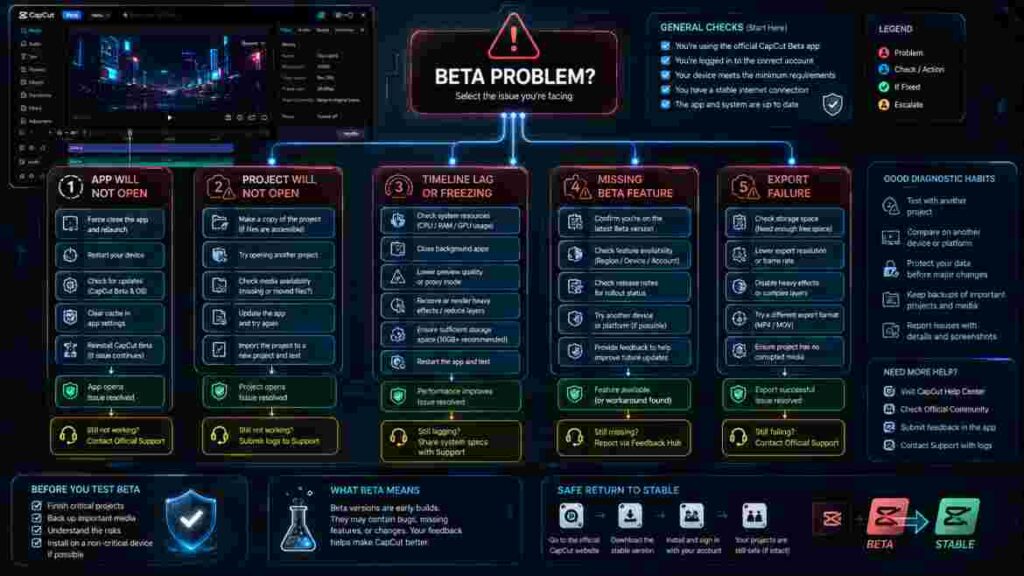
CapCut Beta Will Not Open
Start with low-risk checks.
Restart the device.
Confirm that the operating system is current enough for the installed version.
Check available storage.
Look for an error message.
Record that message before attempting changes.
Then ask whether the problem started immediately after an update.
If it did, the timing is useful evidence, although it does not prove the update is the only possible cause.
A Project Will Not Open
Determine whether the issue affects one project or all projects.
Create a small new project.
If new projects open normally, the application itself is at least partially functional.
That makes the original project, its media, or a feature used within it more likely to be involved.
If nothing opens, the problem may exist at the application or account level.
CapCut Beta Suddenly Becomes Slow
Do not immediately downgrade.
First compare multiple projects.
A complex 4K timeline containing many layers, effects, captions, and high-bitrate media demands far more resources than a small social-media edit.
Create a simple test project.
If that runs smoothly, the original project’s workload matters.
If everything becomes slow only after a particular CapCut Beta update, document the change and check CapCut’s current support guidance.
Timeline Playback Freezes
Look for a pattern.
Does the freeze occur at the same clip every time?
Does it appear when a certain effect begins?
Does it happen during caption generation?
Does it happen only after several minutes of editing?
A reproducible freeze gives you far more diagnostic information than a random one.
Preview Playback Stutters
Preview performance and final export performance are not identical.
A complicated timeline may be difficult to play in real time but still export correctly.
If your exported file is clean, the immediate issue may concern interactive playback rather than final rendering.
That distinction matters.
A Beta Feature Disappears
A disappearing feature is not automatically a bug.
Testing may have ended.
The feature may have moved.
Your account may no longer be part of the experiment.
The tool may have been renamed or incorporated elsewhere.
Check current official information before attempting to install an older CapCut Beta merely to recover the feature.
A Free Feature Suddenly Requires Payment
If the feature was temporarily free because of Beta testing, a future paywall is possible.
CapCut explicitly says selected premium features in its iPad Beta may become paid later.
A change in access may therefore be intentional rather than an account error.
AI Usage Limits Change
AI limits can be particularly dynamic.
Server cost, feature complexity, testing requirements, account plans, and rollout policies can affect access.
Always trust current in-app information over screenshots from old tutorials.
A Tutorial Does Not Match Your Interface
Before following a tutorial, check its publication date, operating system, application version, device, region, and subscription status. These factors can affect CapCut’s interface, feature availability, and the steps shown, so an older tutorial or one created for a different platform may not match what you see on your device.
A tutorial recorded on an Android tablet may not match the normal Android phone interface.
A US iPad user may also see something different from someone in another country because the dedicated iPad application is not currently distributed through the US App Store.
A Project Works on One Device but Not Another
Compare the two environments.
Check application versions.
Check whether one device is using CapCut Beta.
Check whether one platform supports a feature the other does not.
Also verify that all required media is actually available on both devices.
Export Fails After a Beta Update
Try exporting a short section.
If a short section succeeds but the full project fails, project complexity or a specific timeline area may be involved.
If the failure occurs at roughly the same percentage every time, inspect the media and features located around that point.
Check available disk space as well.
Large video exports can require more temporary storage than the final file size suggests.
Reinstalling Does Not Solve the Problem
Reinstallation cannot fix every issue.
A problem may be project-specific, account-related, server-side, connected to a feature rollout, caused by particular media files, or related to compatibility differences between CapCut versions.
If reinstalling the same application does not help, stop repeating the same action and investigate the actual symptom.
How to Leave CapCut Beta and Return to a Stable Version
Leaving CapCut Beta should be treated as a project-management task rather than simply an uninstall task.
Identify Your Current Version
Record the exact version you are leaving.
Identify Which Projects Were Modified
Some projects may never have been opened in Beta.
Others may have been substantially edited and saved.
Treat those categories differently.
Export Urgent Deliverables First
If an important project currently opens and exports successfully, consider producing the required final output before making another software change.
This reduces the chance that a downgrade creates a new problem before your deadline.
Protect Project Data and Source Media
Make sure anything essential is securely stored.
Follow the Correct Platform-Specific Exit Process
A desktop Beta, tablet Beta, and mobile testing program may use different mechanisms.
Do not assume one tutorial applies universally.
Verify Backward Compatibility
This is the most important step.
An older release may not support everything written into a project by a newer version.
Do not treat downgrading CapCut Beta as automatically reversible.
Test Stable CapCut Before Resuming Production
Once you return to your preferred version, open a non-critical project first.
Check media, audio, text, playback, saving, and export.
Then move back to important work.
Is CapCut Beta Safe to Use?
Safety depends partly on what type of risk you mean.
An official CapCut Beta obtained through legitimate distribution channels is fundamentally different from a modified application downloaded from an unknown website.
Beta status itself does not mean malware.
It means the software or experience is still being tested.
Software Security and Project Reliability Are Separate Issues
Software security asks:
Can I trust where this application came from?
Project reliability asks:
Can I trust this version with my editing workflow?
An official application can still contain a bug.
A stable application can also contain a bug.
That is why project backups matter regardless of release status.
Be Cautious With Unofficial “Pro Unlocked” Beta Files
A file promising permanently unlocked paid functionality may have been modified.
You may not know what permissions it requests or what changes were made.
Do not trade account security and client-media security for temporary access to an editing feature.
Consider Privacy When Using Cloud or AI Features
Some editing functions may process data remotely.
Organizations working with sensitive client footage may have policies governing cloud services, AI processing, or third-party applications.
Those rules matter whether the software is Beta or stable.
How CapCut Beta Handles Premium Features, Credits, and AI Tools
AI and premium access create some of the biggest misconceptions around CapCut Beta.
Why Some iPad Features Do Not Require the Same Payment
CapCut says selected premium features are temporarily available on the iPad product during Beta testing.
That means a user may encounter a tool on iPad that behaves differently from the equivalent tool on web, PC, or mobile.
Why This Does Not Mean Credits Are Gone
CapCut uses credits for certain AI-related functionality on supported products.
Temporary Beta access does not eliminate the broader credit model.
It only means the test environment can have different rules.
Why AI Features Are Especially Likely to Change
AI systems evolve quickly.
A feature may change:
model quality;
processing limits;
interface design;
available styles;
credits;
or subscription requirements.
This makes AI-related CapCut Beta tutorials particularly time-sensitive.
Evaluate AI Based on Workflow Value
Do not judge an AI feature only by how impressive its first result looks.
Ask:
How much correction does it need?
How controllable is the output?
Does it save time after cleanup?
Can it reproduce the result consistently?
Does its usage limit suit your production volume?
A feature that saves thirty seconds but creates ten minutes of correction is not an efficiency improvement.
Who Should Consider Using CapCut Beta?
Beta software becomes more valuable when the user has a specific reason to experiment.
Creators Who Enjoy Testing New Editing Workflows
If you enjoy exploring new tools and can tolerate change, CapCut Beta may provide genuine value.
The key is to keep experimentation separate from critical production.
CapCut Tutorial Creators
Tutorial publishers have a strong reason to understand upcoming interface changes.
Testing early allows them to prepare educational content.
However, Beta tutorials should clearly identify:
the version;
platform;
and date.
Otherwise, viewers may follow obsolete instructions months later.
Social Media Managers
High-volume social teams may benefit from workflows that reduce repetitive editing.
However, they also depend heavily on reliability.
A Beta tool should be tested with sample content before being introduced into daily campaign production.
Experienced Hobby Editors
Hobby creators often have the ideal risk profile for testing CapCut Beta because the consequences of a failed experiment may be relatively low.
They can explore features without a client deadline attached.
Creators Evaluating the Dedicated Tablet Experience
Users who want a larger touch-based editing environment may have a clear reason to explore CapCut’s newer tablet-focused products where officially available.
The iPad experience is designed for more advanced multi-track workflows than the normal mobile app.
Who Should Stay With the Stable Version of CapCut?
Not everyone benefits from early access.
Beginners Who Are Still Learning Editing
Stable CapCut provides a better reference environment.
Beginners need to learn editing principles before they need experimental software.
Freelancers With Tight Deadlines
A client is paying for the final video, not for your ability to test the newest software.
Predictability usually matters more.
Creators Working on Large Unfinished Projects
If a large project works correctly in your current environment, there is rarely a strong reason to introduce a major software change before finishing it.
Teams That Need Version Consistency
Collaborative projects benefit from standardized software.
If one editor uses CapCut Beta and the others do not, compatibility becomes another variable the team must manage.
Anyone Looking Only for Free Pro
Beta is not a reliable long-term strategy for avoiding subscription costs.
Temporary premium access may end.
How CapCut Beta Fits Into Professional Editing Workflows
Professional use requires more than asking whether a feature works.
Professionals care about repeatability.
Separate Production From Experimentation
A useful approach is to think in terms of two environments.
Your production environment is the setup you trust for deadlines.
Your testing environment is where you explore new software.
Even if both environments exist on the same physical machine, the mindset matters.
Do not casually turn tomorrow’s paid delivery into today’s CapCut Beta experiment.
Document Version Changes
Professional teams should record software versions used for important projects.
This becomes valuable when reopening an old project months later.
Test Export Before Committing to a Workflow
A feature is not production-ready for your needs merely because it looks correct inside the preview window.
Create a sample final export.
- Picture quality
- Audio sync
- Captions
- Graphics
- Frame rate
- Resolution
- Playback outside CapCut
While reviewing your test export, check for any unwanted branding or watermark as well. If one appears, our guide explains how to remove the CapCut watermark and which options are appropriate for different CapCut exports.
Have a Recovery Plan
Professional reliability is not about never encountering problems.
It is about knowing what you will do when a problem appears.
Keep original assets organized.
Know where project copies are stored.
Understand which version last worked.
Then a software issue becomes manageable rather than catastrophic.
Common Mistakes People Make With CapCut Beta
Several mistakes repeatedly create unnecessary frustration.
Assuming Beta Automatically Means Better
Beta primarily means testing-stage.
It does not mean faster, more powerful, or more suitable for your workflow.
Updating Because a YouTube Tutorial Says You Should
Tutorial creators may have different devices, regions, and needs.
Install CapCut Beta only when the benefit makes sense for your own situation.
Using a Major Client Project as the First Test
Test with disposable footage first.
Assuming Premium Features Will Stay Free
CapCut explicitly warns that temporary iPad premium access may later become paid.
Treating Every APK as an Official Beta
An APK filename proves nothing about who distributed or modified the application.
Assuming All CapCut Platforms Match
The current iPad and mobile products already have meaningful workflow differences.
Blaming Every Performance Problem on Beta
Timeline complexity and hardware limitations matter too.
Reinstalling Before Protecting Projects
Destructive troubleshooting should come later, not first.
Forgetting to Test Export
Preview success does not guarantee final-export success.
Building a Business Around Temporary Access
If a temporarily free feature becomes paid, your production economics can change.
Plan accordingly.
Best Practices for Using CapCut Beta Responsibly
A disciplined approach gives you the benefits of experimentation without turning your workflow into chaos.
Test One Change at a Time
If you change the operating system, CapCut version, project location, and media workflow on the same day, diagnosing a problem becomes difficult.
Change fewer variables.
Keep a Simple Version Log
You do not need enterprise software.
A basic note can record:
date;
application version;
operating system;
major changes;
and problems observed.
Use Realistic Test Footage
A five-second low-resolution clip tells you very little about how CapCut Beta will handle your normal workflow if you usually edit 4K footage with multiple layers.
Evaluate the Entire Workflow
Test import, editing, saving, reopening, playback, and export.
Separate Feature Quality From Application Stability
A new feature may be excellent even if the surrounding Beta is inconvenient.
The opposite can also happen.
Evaluate each dimension independently.
Send Useful Feedback
Detailed bug reports are far more helpful than saying a version is “bad.”
Describe exactly what happened and how another person could reproduce it.
CapCut Beta for Short-Form Content Creators
Short-form creators often care about production speed more than anything else.
They may edit TikTok videos, Instagram Reels, YouTube Shorts, advertisements, product clips, or creator content every day.
A Beta tool that genuinely reduces repetitive work can therefore have real value.
But high-volume creators also have more to lose from disruption.
If you publish several pieces every day, even a minor interface change can slow down production.
Before integrating CapCut Beta into a short-form workflow, test whether the new feature saves time across several projects rather than only once.
CapCut Beta for YouTube and Long-Form Projects
Long-form editing increases the cost of software problems.
A 20-second clip can be rebuilt quickly.
A forty-minute YouTube video with hundreds of edits cannot.
Large projects may contain:
multiple video tracks;
many audio layers;
graphics;
captions;
B-roll;
music;
sound effects;
and complicated timing decisions.
If you are halfway through a large project, staying with the version that already works is usually sensible.
Test CapCut Beta between major projects rather than during them.
CapCut Beta for Freelancers and Agencies
Freelancers and agencies operate under a different risk model because editing downtime directly affects revenue.
A Beta feature may be impressive, but it should solve a meaningful production problem before being introduced into paid work.
Ask:
Does this reduce turnaround time?
Does it improve the final result?
Can the team reproduce the workflow?
Does it work across required devices?
Can projects still be reopened reliably?
If the answers are unclear, keep testing.
CapCut Beta for Teams and Cross-Device Editing
Cross-device editing can become confusing because “same account” does not necessarily mean “same software environment.”
A team may include:
- Windows editors
- Mac editors
- Mobile editors
- iPad users
- Web users
Select 86 more words to run Humanizer.
Each can encounter different feature availability.
Standardize Versions Before Important Projects
Agree on the software versions your team will use.
If someone needs CapCut Beta for testing, keep that experiment separate from shared production until compatibility has been verified.
Do Not Assume Cloud Sync Solves Feature Differences
Cloud synchronization can move project data, but it cannot automatically give one platform a feature that exists only on another.
Test Project Handoffs
Before a major collaborative job, create a small test project.
Open it on the required devices.
Make changes.
Save it.
Open it again.
That five-minute test can reveal compatibility problems before they affect a large project.
How to Decide Whether a CapCut Beta Feature Is Actually Useful
New features are easy to overvalue because novelty feels productive.
to decide whether a capcut beta version is useful than Use a structured comparison.
Define the Problem First
For example:
“I spend fifteen minutes cleaning captions on every video.”
Measure Your Existing Method
Record the approximate time and quality.
Test the New Method
Use comparable footage in CapCut Beta.
Include Correction Time
If the new feature generates output quickly but requires heavy correction, count the correction time.
Evaluate Control
A fast tool that removes creative control may not suit professional work.
Repeat the Test
One successful result may be luck.
Try several realistic projects.
Make a Workflow Decision
The final answer may be:
use it all the time;
use it for specific projects;
or stay with the stable method.
That is a real productivity decision.
Myths About CapCut Beta That Cause Confusion
Where there is a new thing introduced there are myths also.
CapCut Beta Is Free CapCut Pro
No.
Temporary premium access exists in particular Beta contexts, but Beta and Pro remain different concepts.
CapCut Beta Always Has More Features
Not necessarily.
A Beta may focus on a platform redesign or technical optimization rather than adding a large feature set.
CapCut Beta Is Always Unstable
Also false.
Some Beta builds may perform well.
Testing status simply means you should accept more uncertainty.
You Need Beta to Get Normal CapCut Updates
No.
Stable CapCut receives regular updates.
Any Beta APK Is Official
No.
because distribution source matters.
Beta Features Will Always Become Stable Features
Not guaranteed.
A test may change significantly or disappear.
Everything Free in Beta Will Stay Free
CapCut’s current iPad documentation explicitly says otherwise.
Is CapCut Beta Worth Using in 2026?
The answer depends on why you want it.
CapCut Beta can be worthwhile when you have a specific feature or workflow to test and you can tolerate additional change.
It can also be useful for tutorial creators who need to understand upcoming interfaces, hobby editors who enjoy experimenting, and tablet users exploring CapCut’s newer advanced editing environments.
It makes less sense when your priority is predictable production.
A freelancer with three videos due tomorrow has a very different risk tolerance from a hobby creator experimenting on Saturday afternoon.
The software can be identical.
The right decision can still be different.
CapCut Beta Is Worth Considering When Early Access Matters
If you actively need to evaluate new functionality before wider release, Beta can provide genuine value.
Stable CapCut Is Better When Reliability Matters More
If your current setup already produces the result you need, there is no requirement to chase every new version.
CapCut Pro Is the Better Question When You Need Premium Access
If your actual objective is dependable access to premium features rather than testing new software, evaluate CapCut Pro separately.
Do not use temporary CapCut Beta access as a substitute for understanding the long-term cost of your workflow.
Final Thoughts: Should You Use CapCut Beta in 2026?
Beta Version is not simply “better CapCut,” and that is the most important point to take away from this guide.
It is a testing-stage experience designed to help CapCut develop, refine, and evaluate software before every detail is finalized. In some cases, that gives users earlier access to new workflows or temporary premium functionality. In other cases, the main differences may involve interface changes, performance optimization, tablet-specific design, or experimental behavior.
The current dedicated iPad experience demonstrates both the appeal and the limitations of Beta. CapCut is allowing users to explore selected premium functionality while the product remains in development, but it also clearly warns that those access conditions may change once the product matures.
For hobby creators, software enthusiasts, tutorial publishers, and experienced editors who deliberately want to test something new, CapCut Beta can be worth exploring.
For beginners, client editors, agencies, and creators working on large deadline-sensitive projects, the stable version usually remains the safer default unless a Beta provides a specific benefit that has already been tested.
Do not install a testing release simply because it carries a newer version number.
Do not confuse temporary premium access with permanent ownership.
Do not assume an unofficial modified download is an authentic Beta.
And do not make an important client project your first experiment.
The smartest approach is simple: identify what you want to gain, verify the official availability for your device and region, protect important work, test the full editing workflow with non-critical footage, and only then decide whether the Beta improves the way you create.
Used this way, CapCut Beta can be a useful testing environment rather than an unnecessary source of uncertainty.