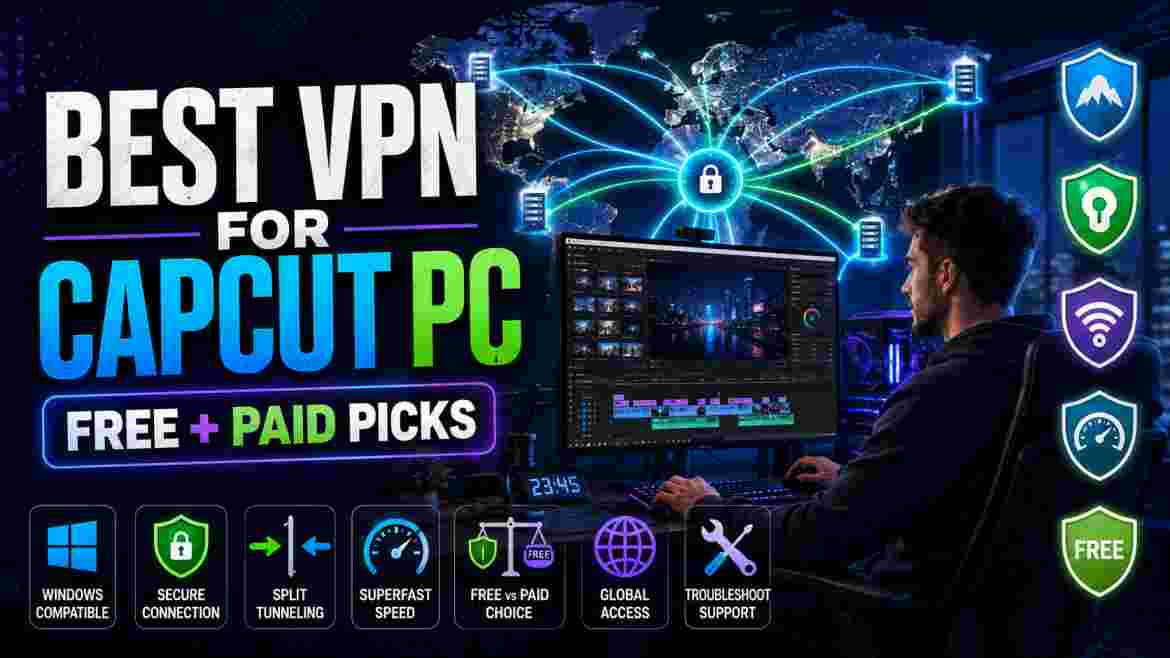
If CapCut Desktop is not connecting properly, certain online tools are unavailable, or some cloud-based features appear restricted where you live, using a VPN may help. But choosing the best VPN for CapCut PC is not as simple as installing the first free VPN you find and connecting to a U.S. server.
A VPN changes how your PC connects to the internet and can give websites and online services a different IP location. That can be useful when the problem is related to regional availability, a restrictive network, or routing. It cannot, however, upgrade your CapCut account, add AI credits, make unsupported desktop templates suddenly compatible, or make a weak CPU render videos faster.
For most Windows users, NordVPN is our best paid overall choice, mainly because of its mature Windows app, NordLynx protocol, broad server choice, split tunneling, and straightforward device-wide protection. Proton VPN is the strongest free starting point because its Free plan currently has no data cap or artificial speed limit. Surfshark is especially attractive for creators who want one subscription across many devices, while ExpressVPN offers a polished premium Windows experience and Windscribe provides another practical free option with a monthly data allowance.
That recommendation comes with an important qualification: the best VPN for CapCut PC depends on the problem you are actually trying to solve.
CapCut’s own support material says connection failures can come from the network, device, app version, firewall, expired sessions, or even an interfering VPN. CapCut also confirms that some AI functionality can depend on region, credits, platform, account state, and staged rollout.
So this guide does more than rank VPNs. It explains when you need one, when you do not, which free and paid services make the most sense for Windows creators, how to set one up properly, and what to check when CapCut still refuses to cooperate.
Quick recommendation
Best paid overall: NordVPN
Best free option: Proton VPN
Best for many devices: Surfshark
Best premium experience: ExpressVPN
Best alternative free plan: Windscribe
Best VPN for CapCut PC: Quick Verdict
If you only want the short answer, these are the five options that make the most sense for different types of CapCut Desktop users.
| VPN | Best for | Free plan? | Windows split tunneling | Main limitation |
|---|---|---|---|---|
| NordVPN | Best paid overall | No | Yes | Costs more than using a capable free service |
| Proton VPN | Best free option | Yes | Windows app supports split tunneling, though plan features vary | Free server/location choice is limited |
| Surfshark | Multi-device creators | No permanent free plan | Yes, via Bypasser | Long-term plan usually makes more financial sense than monthly |
| ExpressVPN | Premium simplicity | No permanent free plan | Yes | Often more expensive than value-focused rivals |
| Windscribe | Flexible free alternative | Yes | Yes | Free usage is capped monthly |
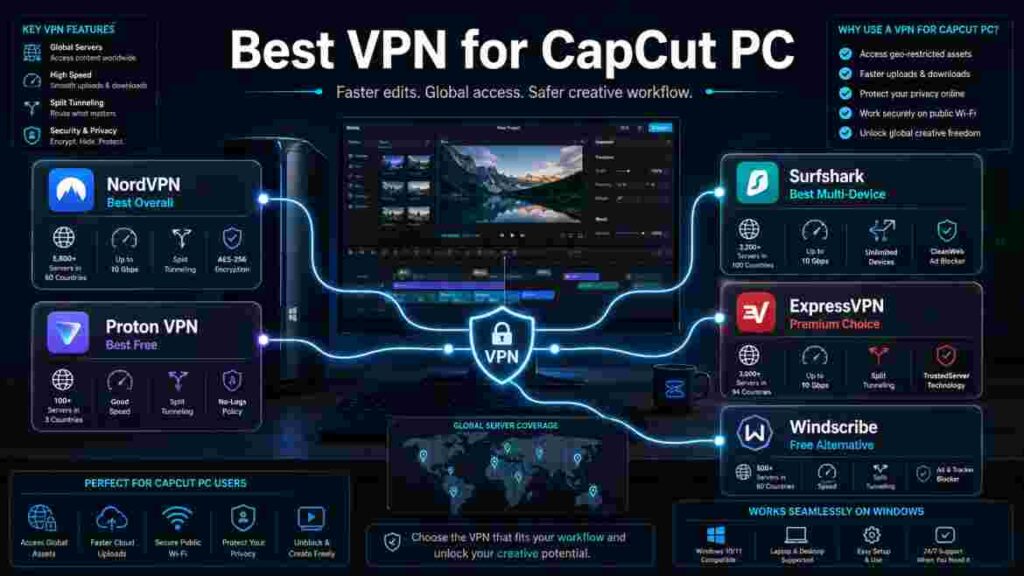
For someone who regularly edits on Windows and wants a dependable paid service, NordVPN is our current pick for the best VPN for CapCut PC. Its Windows app supports device-wide VPN protection, and NordVPN currently allows up to 10 simultaneous device connections. Its Windows offering also includes NordLynx, split tunneling, obfuscated servers, and broad location coverage.
For users who primarily came here searching for the best free VPN for CapCut PC, Proton VPN deserves the first try. Proton officially states that its Free plan has unlimited data, no artificial speed limit, and no ads. Free users are automatically connected within a smaller selection of countries rather than receiving the same location freedom as paid users.
Surfshark is more compelling when CapCut is only one part of your creator setup. A social-media creator may have a Windows PC, Android phone or iPhone, tablet, secondary laptop, streaming device, and possibly several family devices. Surfshark currently advertises unlimited simultaneous connections after the trial period, so there is much less pressure to count device slots.
ExpressVPN is the premium alternative for readers who value a polished Windows application and do not mind paying more for it. Its 2026 Windows documentation includes Lightway Turbo and app/IP-based split tunneling, while current subscription tiers support between 10 and 14 simultaneous devices depending on the plan.
Windscribe rounds out the list because its free Windows plan is genuinely usable for occasional CapCut needs. A confirmed-email free account currently receives 10GB per month, while accounts without a confirmed email receive 2GB. Its Windows app includes split tunneling and several protocols, including WireGuard.
The important point is that the best VPN for CapCut PC is not necessarily the most expensive VPN. If you only need to test whether your network or IP location is the problem, paying immediately may be unnecessary.
Do You Actually Need a VPN for CapCut PC?
Before buying anything, identify why CapCut is not behaving as expected.
This matters because many users search for the best VPN for CapCut PC after seeing a missing effect, AI tool, template, or connection warning and assume location is automatically responsible.
Sometimes it is.
Sometimes it is not.
“If the feature you are trying to access is part of the paid version rather than region-restricted, our CapCut Pro 2026 guide explains the current premium features, AI tools, pricing, and when upgrading makes sense.”
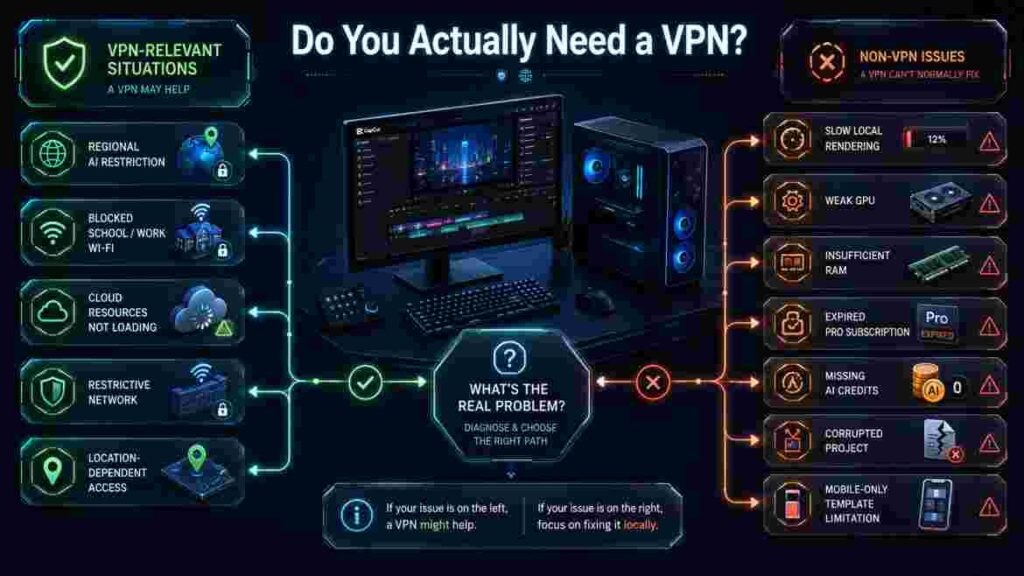
When a VPN may genuinely help
A VPN is most relevant when there is evidence that your connection or apparent region is involved.
Examples include:
- CapCut services are restricted on the network you are using.
- Your school, workplace, hotel, or public Wi-Fi blocks certain cloud services.
- A CapCut AI function explicitly says it is unavailable in your region.
- A service behaves differently when you switch to another network.
- You are traveling and need secure access to services you normally use at home, where permitted.
- Your internet route to a cloud service is unreliable and another VPN route works better.
- You want additional privacy when editing or uploading through public Wi-Fi.
CapCut acknowledges that some AI functionality can be unavailable because of geographical restrictions and that its services may detect location from an IP address.
That is a legitimate reason to investigate a VPN.
When a VPN probably will not help
A VPN is unlikely to fix a purely local editing problem.
If CapCut takes a long time to render a complex 4K timeline, the cause is more likely related to your processor, GPU, RAM, storage, effects, codecs, or project complexity than the IP address assigned by your internet provider.
CapCut’s current recommended desktop specifications include Windows 10/11 64-bit, an Intel Core i5 or Ryzen 5-class processor, 8GB–16GB of RAM, dedicated graphics with 4GB or more VRAM, and SSD storage for smoother demanding workflows.
Connecting to New York, London, or another VPN location does not give your computer more RAM or a faster GPU.
The same reasoning applies to account restrictions.
If an AI operation requires credits and you have no credits, changing the IP address does not create credits. CapCut explicitly says some AI tools use its credit system and can fail because the account does not have enough available credits.
Similarly, a VPN cannot turn a free account into CapCut Pro.
A quick diagnostic before choosing the best VPN for CapCut PC
Use this table before subscribing.
| Your CapCut problem | Can a VPN help? | What to investigate first |
| Feature explicitly unavailable in your region | Possibly | Region, account, app version, feature rollout |
| CapCut blocked on school/work/public network | Possibly | Network restrictions and firewall rules |
| Cloud resources do not load | Possibly | Internet, routing, VPN, firewall, server status |
| CapCut says “No Internet Connection” | Maybe | Connection, firewall, account session, VPN itself |
| Local export is slow | Usually not | CPU, GPU, RAM, storage, effects, codec |
| App crashes when opening a project | Usually not | Version, project corruption, hardware/resources |
| Pro feature asks for payment | No | Subscription entitlement |
| AI feature says credits are insufficient | No | Credit balance |
| Trending mobile template missing on desktop | Often no | Platform limitation |
| Specific effect disappeared | Not necessarily | Licensing, removal, rollout, version, region |
| TikTok template link will not open on PC | No in many cases | Desktop workflow limitation |
| CapCut works on hotspot but not office Wi-Fi | Possibly | Restricted local network |
This distinction is what many “best VPN” lists skip.
CapCut Desktop does not mirror the mobile app
One of the biggest reasons a user can misdiagnose the problem is the difference between CapCut platforms.
CapCut’s own documentation says Desktop has more limited template discovery than Mobile. Some template experiences, especially TikTok-connected or mobile-community workflows, are not available the same way on the Windows application.
That means you could install the best VPN for CapCut PC, connect successfully, change your IP, and still not see the mobile template workflow you expected.
The VPN did not necessarily fail.
You may simply be asking the desktop application to provide something CapCut designed differently on mobile.
Region is only one variable
A missing CapCut feature can depend on:
- IP region
- account eligibility
- CapCut version
- Windows version
- staged rollout
- subscription
- AI credit balance
- desktop versus mobile availability
- licensing
- device capability
- server-side changes
CapCut notes, for example, that its AI Video Maker on Desktop may be gradually rolled out, meaning two users with updated software can still see different availability.
So before spending money, ask one question:
Is there evidence that my connection or location is actually the problem?
If yes, continue with the VPN recommendations.
If no, troubleshoot CapCut first.
How We Chose the Best VPN for CapCut PC
This ranking is designed around the needs of a Windows CapCut user rather than a generic “best VPN” score.
We did not invent private laboratory speed tests or claim personal hands-on testing that was not performed. The recommendations are based on current official Windows documentation, available plan restrictions, feature availability, server/location flexibility, free-plan policies, pricing information, and the practical requirements of cloud-connected CapCut workflows.
Here is what matters most when choosing the best VPN for CapCut PC.
1. A real Windows application
CapCut Desktop is a Windows application, not merely a website.
For that reason, we prioritize providers with a proper Windows VPN client rather than relying on browser extensions.
When a full VPN app establishes a system-level connection, traffic from desktop applications can use that tunnel. A browser extension may work differently and can be limited to browser traffic depending on its design.
For CapCut Desktop, the full Windows app is usually the cleaner starting point.
2. Connection reliability
Uploading cloud media, downloading effects, synchronizing projects, authenticating an account, or running cloud-based AI tools can involve internet traffic.
A VPN connection that repeatedly disconnects becomes a workflow problem of its own.
We therefore favor established Windows applications with modern protocols and mature reconnection behavior.
3. Reasonable server-location choice
The nearest suitable VPN server is often preferable to a random server on another continent.
If you are in Europe and only need a non-restricted European endpoint, connecting thousands of miles away may add unnecessary latency.
A larger location selection also gives you alternatives when one VPN endpoint is congested or does not work properly.
4. Split tunneling
Split tunneling is particularly useful for a creator PC.
Suppose you want CapCut to use the VPN but you want a local banking application, printer service, multiplayer game, or another region-sensitive program to use your normal connection.
A good Windows split-tunneling feature can make that possible.
NordVPN, Surfshark, ExpressVPN, Proton VPN, and Windscribe all provide relevant Windows traffic-routing functionality, although exact modes and availability can differ by product and plan.
5. Modern VPN protocols
Modern protocols can reduce the performance penalty of using a VPN.
Examples in our shortlist include:
- NordLynx
- WireGuard
- Lightway
- OpenVPN
- Stealth-style protocols on restrictive networks
The protocol is not the only factor that affects performance. Distance, server load, your original internet speed, local congestion, Wi-Fi quality, and ISP routing all matter.
6. Free-plan honesty
A “free VPN” can mean very different things.
One provider might offer unlimited data with limited server selection. Another might provide 10GB per month. Another may advertise a free trial that requires payment details and automatically becomes a paid subscription.
For readers searching for the best VPN for CapCut PC without paying, those differences matter enormously.
7. Price versus actual creator value
We do not automatically prefer the VPN with the longest feature list.
If you only need a VPN occasionally to test a CapCut connection problem, antivirus bundles, identity monitoring, cloud storage, or other extras may have little value to you.
For this use case, the basic VPN tier is usually the relevant comparison.
8. Privacy and safe distribution
The VPN sees network traffic passing through its infrastructure, so provider quality matters.
At minimum, install Windows VPN software from the provider’s official website or a legitimate app store. Avoid unofficial “premium unlocked” installers, cracked clients, modified CapCut packages, and suspicious free tools promising impossible benefits.
Saving a few dollars is not worth introducing unknown software into the same computer that stores your videos, client files, account logins, and creator assets.
Best VPN for CapCut PC Comparison
Here is the practical comparison before we look at each service in detail.
| Feature | NordVPN | Proton VPN | Surfshark | ExpressVPN | Windscribe |
| Best fit | Paid overall | Free users | Many devices | Premium simplicity | Free alternative |
| Permanent free plan | No | Yes | No | No | Yes |
| Windows 10/11 | Yes | Yes | Yes | Yes | Yes |
| Free data | — | Unlimited | — | — | 10GB/mo with confirmed email |
| Split tunneling | Yes | Yes | Bypasser | Yes | Yes |
| Notable protocol | NordLynx | WireGuard | WireGuard | Lightway | WireGuard |
| Simultaneous-device highlight | 10 | Paid plan up to 10 | Unlimited after trial | 10–14 by tier | Unlimited devices advertised on Windows plan |
| Good for occasional CapCut use | Yes, but paid | Excellent | Good | Good, but premium | Very good |
| Main disadvantage | Subscription cost | Limited free location control | No permanent free tier | Higher value hurdle | Free data cap |
No single entry can be declared the best VPN for CapCut PC for everyone.

The rest of the article explains why.
1. NordVPN — Best VPN for CapCut PC Overall
NordVPN earns our overall paid recommendation because it gets the Windows fundamentals right without requiring CapCut users to buy an elaborate cybersecurity bundle.
For a creator who wants a full Windows VPN, good location flexibility, fast protocol support, split tunneling, and an established desktop application, it is a balanced choice.
Why NordVPN fits CapCut Desktop
NordVPN’s Windows application routes traffic through the VPN at device level when connected. Its official support documentation says a single account currently supports up to 10 devices at the same time.
For CapCut, that means you can install the actual Windows VPN rather than trying to make a browser extension solve a desktop-app problem.
That distinction sounds obvious, but it matters.
If your reason for searching for the best VPN for CapCut PC is that the Windows app cannot reach an online service, you want the VPN configuration to include CapCut’s network traffic.
NordLynx and everyday creator performance
NordVPN’s standout protocol is NordLynx.
The company positions NordLynx as its high-speed protocol and makes it available through the Windows app.
A fast protocol matters because every VPN adds some overhead. Your traffic travels through an additional server and is encrypted along the way.
That does not mean the VPN will necessarily feel slow. On a strong home connection with a nearby server, the difference may be modest. But distance and server choice matter.
For CapCut specifically, a VPN can affect:
- downloading online effects
- syncing cloud projects
- authentication
- cloud-based AI actions
- importing online resources
- account-related requests
It does not accelerate local timeline rendering.
Split tunneling is useful on an editing PC
NordVPN supports split tunneling on Windows 10 and Windows 11.
You can choose applications that should bypass the encrypted tunnel.
Imagine you are editing in CapCut while also:
- accessing a local network drive
- controlling a printer
- running a game launcher
- using a location-sensitive work app
- joining a video call
- accessing a service that dislikes VPN addresses
Rather than turning your VPN on and off repeatedly, split tunneling may allow you to create a cleaner workflow.
Server flexibility
NordVPN’s current Windows page advertises thousands of servers across more than 200 locations.
The number itself matters less than the practical benefit: you usually have multiple nearby endpoints and alternative countries to test.
For the best VPN for CapCut PC, flexibility is more valuable than connecting to a famous country simply because someone on YouTube said “use USA.”
Obfuscated connections
NordVPN also offers obfuscated servers.
These are designed for networks where normal VPN traffic may itself be restricted or detected.
That may be useful on some tightly controlled networks, although users should always follow local laws, organizational policies, and applicable service terms.
NordVPN pricing and value
As of the pricing snapshot reviewed for this article, NordVPN’s U.S. pricing page lists its Basic two-year introductory offer at $3.49 per month equivalent for the first 27 months, billed upfront at $94.23, with a higher renewal rate. Monthly Basic is listed at $14.99. Offers, tax, currency, region, billing period, and renewal pricing can change.
For a CapCut user, the Basic tier is generally the relevant starting point.
You do not need to pay for password management, identity monitoring, cloud storage, or a wider security package merely because you edit videos.
Buy the extras only if you would use them independently of CapCut.
Who should choose NordVPN?
NordVPN makes sense if:
- you use CapCut Desktop regularly;
- you want a paid, full-featured Windows VPN;
- you need several server-location choices;
- split tunneling matters;
- you use the VPN for more than CapCut;
- you want VPN protection across several devices;
- you value easier server switching over a minimal free service.
Who should skip NordVPN?
Skip it if:
- you only need a VPN once or twice;
- Proton VPN Free already solves your problem;
- your CapCut issue has nothing to do with networking or region;
- you do not want a long subscription;
- paying for a VPN would not improve your actual workflow.
NordVPN verdict
For a creator who genuinely needs a paid service, NordVPN is our best VPN for CapCut PC overall.
But “best overall” does not mean “best value for every reader.”
If all you need is a no-cost connection test, start with Proton VPN before spending money.
2. Proton VPN — Best Free VPN for CapCut PC
Proton VPN is the most important service in this guide because a large percentage of people searching for the best VPN for CapCut PC do not actually want a VPN subscription.
They want CapCut to work.
If a free tool can determine whether the network or IP region is causing the problem, there is little reason to begin with a paid contract.
Why Proton VPN Free stands out
The biggest advantage is simple: no monthly data cap.
Proton says its Free plan does not impose bandwidth or data limits, and its free Windows page also states that there are no artificial speed limits or ads.
That is a major advantage over free services that give you only a few gigabytes.
CapCut can involve large online assets, cloud uploads, and downloads. A tiny free allowance can disappear quickly.
Unlimited data removes that particular concern.
Windows support
Proton provides a dedicated application for Windows 10 and Windows 11, including support for x64 and ARM hardware.
Its Windows application supports multiple protocols and advanced functions, including WireGuard, OpenVPN, Stealth, kill-switch options, and split tunneling, although some advanced functionality is tied to paid plans.
That is considerably more appropriate for CapCut Desktop than relying on a questionable browser-only proxy.
The free server limitation matters
Free does not mean unlimited choice.
Proton’s current free Windows documentation lists free-server countries including the United States, Canada, Mexico, Switzerland, Norway, Poland, Romania, the Netherlands, Singapore, and Japan, with free users automatically connected within the available free network rather than receiving unrestricted paid-level server selection.
That creates an important decision point.
If you simply want to test whether routing CapCut through a VPN changes the result, Proton Free is excellent.
If you need a specific country every day, paid service may be more appropriate.
What about speed?
Proton does not impose an artificial data or speed limit on Free, but that does not mean every free connection will equal the best paid server at every moment.
Server load, distance, original broadband quality, and network conditions can affect performance. Proton acknowledges these factors in its own support material.
If one connection feels poor, do not immediately conclude that VPNs are unusable for CapCut.
Test again later or compare another provider.
Proton Free is ideal for diagnosis
This is where Proton becomes one of the smartest choices in the entire article.
Suppose CapCut Desktop shows a regional AI restriction.
You could:
- install Proton VPN Free;
- connect;
- restart CapCut;
- test the exact feature again.
If nothing changes, you have learned something without paying.
Perhaps the issue is:
- account eligibility;
- desktop rollout;
- credits;
- app version;
- platform limitation;
- an unsupported feature;
- a non-region-related error.
That makes Proton not just the best free VPN for CapCut PC, but a useful troubleshooting tool.
Proton Free versus Proton paid
Proton’s paid plans add more location choice, more servers, greater premium feature access, and up to 10 simultaneous devices. Proton currently advertises paid access across more than 140 countries.
Upgrade if:
- the Free plan proves that a VPN solves your problem;
- you need a particular location;
- you use a VPN every day;
- free endpoints are inconvenient;
- you need multiple simultaneous connections;
- you want additional paid features.
Do not upgrade simply because the software has an upgrade button.
Who should use Proton VPN Free?
It is ideal for:
- beginners;
- students;
- occasional CapCut users;
- people testing a regional problem;
- users who do not want another subscription;
- creators who need unlimited free data more than broad free location choice.
When Proton is not the best VPN for CapCut PC
Consider a paid alternative if:
- you need consistent manual control over a particular country;
- you rely on the VPN professionally every day;
- you need more predictable premium-server availability;
- you use many devices simultaneously;
- your CapCut workflow depends on location flexibility.
Proton VPN verdict
For readers who want to spend $0, Proton VPN is our best VPN for CapCut PC.
It is also the VPN we would try first when you are not even sure that a VPN is necessary.
3. Surfshark — Best for Multi-Device CapCut Creators
Surfshark becomes interesting when your editing workflow extends far beyond one PC.
Modern content creators rarely work on a single device.
You may shoot on a phone, upload from a tablet, edit on Windows, check social analytics on another laptop, and manage creator accounts across several devices.
That is where Surfshark distinguishes itself.
Unlimited device connections
Surfshark currently advertises unlimited simultaneous connections on paid subscriptions after the free-trial restriction ends.
For a single Windows PC, that is not automatically valuable.
For a creator household or multi-device workflow, it can be.
Instead of deciding which ten devices deserve VPN access, you can install the service more broadly.
Bypasser on Windows
Surfshark calls its split-tunneling feature Bypasser.
On Windows, Bypasser can be configured in two especially useful ways:
- selected apps bypass the VPN; or
- selected apps are routed through the VPN.
Surfshark’s support documentation also allows selecting an application executable manually.
That opens up a useful CapCut workflow.
You could configure CapCut to use the VPN while other Windows traffic remains on your ordinary internet connection.
Or you could protect everything except a particular application that causes problems when the VPN is active.
Why that matters for creators
A creator PC may simultaneously handle:
- CapCut Desktop
- cloud storage
- browsers
- Discord
- Slack
- Zoom
- local NAS software
- games
- banking
- social networks
- client portals
Some of those services may respond differently to VPN traffic.
Selective routing gives you more control than repeatedly disconnecting the entire VPN.
Performance and WireGuard
Surfshark supports WireGuard in addition to other VPN protocols. Its current service pages also advertise thousands of servers around the world.
As with every provider in this guide, we are not claiming that Surfshark will always be faster than every rival on your specific broadband connection.
VPN performance is situational.
A nearby Surfshark server may outperform a distant competitor server, while another network could produce the opposite result.
Surfshark pricing
At the time checked for this article, Surfshark’s main pricing page showed a promotional Starter price of $2.49 per month equivalent for the first 27 months, billed upfront, with VAT potentially applying. Promotional prices can vary by coupon, country, currency, date, and renewal term.
The correct takeaway is not “Surfshark always costs $2.49.”
The takeaway is that its long-term entry tier is often aggressively priced compared with monthly plans.
Always inspect:
- total upfront charge;
- initial subscription length;
- added promotional months;
- renewal price;
- local tax;
- refund terms.
Surfshark Starter versus larger bundles
If your goal is simply finding the best VPN for CapCut PC, the Starter-level VPN offering is usually what deserves attention.
Antivirus, monitoring, data-removal, and other bundled security products might be useful independently, but they do not make CapCut edit videos better.
Do not confuse more bundled products with a better CapCut VPN.
Who should choose Surfshark?
Choose it if:
- you have many creator devices;
- you share a VPN within a household;
- Windows split tunneling matters;
- you want a lower long-term price than some premium rivals;
- you use CapCut on PC but also care about mobile-device VPN coverage.
Who should skip it?
Skip it if:
- you need a permanently free VPN;
- you dislike multi-year commitments;
- Proton Free already does enough;
- CapCut is the only application for which you need VPN access.
Surfshark verdict
Surfshark is not automatically the best VPN for CapCut PC on one isolated Windows machine.
It becomes one of the strongest values when the same creator has many devices and wants to protect all of them without counting connection slots.
4. ExpressVPN — Best Premium Choice for Simplicity
ExpressVPN is the premium choice in this guide.
It is not the cheapest route to getting CapCut through a VPN, and that is precisely why its recommendation must be contextual rather than promotional.
If you value a polished Windows client, modern protocol development, flexible split tunneling, and a premium service more than maximizing value per dollar, ExpressVPN deserves consideration.
Current Windows support
ExpressVPN’s August 2026 setup guide supports Windows 10 and Windows 11 and includes current instructions for x64 systems, with separate ARM64 support.
For CapCut users on newer ARM-powered Windows laptops, native support is worth checking when comparing VPN applications.
Lightway and Lightway Turbo
ExpressVPN uses its Lightway protocol family.
Its current Windows documentation includes Lightway Turbo, which can use single- or dual-tunnel modes. ExpressVPN states that performance gains depend on network quality, distance, and server conditions rather than promising identical gains for every connection.
That caveat is important.
No protocol can eliminate geography or fix poor broadband.
Split tunneling
ExpressVPN’s current desktop software lets users choose which applications use the VPN and which bypass it.
Windows users can also create rules based on IP address or subnet.
For the best VPN for CapCut PC, application-level control is more useful than a feature list full of unrelated privacy extras.
One possible setup is:
CapCut → VPN
Everything else → normal connection
That minimizes unnecessary routing if CapCut is the only program that benefits from the VPN.
One technical trade-off to know
ExpressVPN notes that Lightway Turbo and split tunneling cannot be used together in the same configuration.
That is the kind of limitation that matters in a real Windows workflow.
If split tunneling is essential, configure around that requirement instead of assuming every premium feature can be enabled simultaneously.
Device allowances
ExpressVPN now uses tiered plans.
Its August 2026 documentation lists:
- Basic: 10 simultaneous devices
- Advanced: 12
- Express Pro: 14
Most individual CapCut creators do not need 14 active VPN connections.
Again, buy based on actual use.
ExpressVPN pricing
At the time checked, ExpressVPN’s checkout page listed its two-year introductory Basic promotion at $2.99 per month equivalent for the first 28 months, billed upfront at $83.72, followed by a higher annual renewal. Promotions change, so treat that as a dated snapshot rather than a permanent promise.
Its plan structure currently includes Basic, Advanced, and Pro tiers.
For CapCut alone, Basic is normally the most rational place to start.
Who should choose ExpressVPN?
Consider it if:
- you want a premium Windows experience;
- you use VPN software for many purposes beyond CapCut;
- Lightway appeals to you;
- app-based split tunneling is important;
- you are comfortable paying for convenience.
Who should avoid it?
Look elsewhere if:
- your highest priority is a permanent free plan;
- you want the lowest possible long-term cost;
- you only occasionally need a new IP;
- CapCut is the only reason you are buying a VPN.
ExpressVPN verdict
ExpressVPN can absolutely be the best VPN for CapCut PC for a user who prioritizes a polished premium service.
For a budget-conscious CapCut-only user, however, Proton VPN Free or a cheaper paid plan may deliver better value.
5. Windscribe — Best Flexible Free Alternative
Windscribe is the other free service worth taking seriously in this comparison.
Unlike Proton VPN, Windscribe standard free plan has a monthly data cap. In return, Windscribe offers a feature-rich Windows application and a different balance of free locations, protocols, and traffic control.
How much free data do you get?
Windscribe states that a free account receives 2GB per month without a confirmed email address.
Add and confirm an email address and the standard allocation increases to 10GB per month.
For light CapCut use, 10GB may be enough.
For frequent cloud uploads and downloads, it may not be.
This is why Proton remains our first free recommendation for the best VPN for CapCut PC.
Windows support
Windscribe provides a native Windows 10/11 application for x64 and ARM64 systems. Its current Windows page also lists WireGuard, IKEv2, OpenVPN TCP/UDP, Stealth, and WSTunnel among available protocols.
That gives advanced users plenty to experiment with on unusual or restrictive networks.
Split tunneling
Windscribe supports both inclusive and exclusive split-tunneling approaches.
You can either:
- exclude selected applications from the VPN; or
- include only selected applications in the VPN.
It also supports IP/hostname-based rules.
For CapCut, inclusive mode can be particularly useful if you want only the editor to use the VPN.
Free versus Pro
Windscribe’s May 2026 pricing documentation lists three broad options:
- Free
- Build-A-Plan
- Pro
The standard yearly Pro price is listed at $69, while the monthly plan is $9. Build-A-Plan has a minimum purchase requirement and lets users pay for selected locations. Promotions may alter actual checkout pricing.
That Build-A-Plan concept is unusual and potentially useful for someone who does not need a giant VPN network.
Proton VPN Free versus Windscribe Free
This is one of the more useful comparisons in the article.
Choose Proton Free if:
- unlimited data is your priority;
- you do not want to watch a monthly bandwidth meter;
- you only need basic VPN access;
- automatic free-server selection is acceptable.
Choose Windscribe Free if:
- 10GB per month is enough;
- you value Windscribe’s Windows controls;
- you want its protocol options;
- you prefer its free-location arrangement.
Neither is universally better.
For most frequent CapCut use, unlimited Proton data is easier to live with.
Who should use Windscribe?
Windscribe works well for:
- occasional CapCut users;
- people troubleshooting network restrictions;
- advanced Windows users who like protocol control;
- users who want a second free VPN to compare against Proton;
- creators whose VPN traffic remains below the free allowance.
Windscribe verdict
Windscribe is a credible free alternative, but its data cap prevents it from taking our overall free crown.
If your workflow is light, it may still be the best VPN for CapCut PC for your particular setup.
Free VPN vs Paid VPN for CapCut PC: Which Should You Choose?
This is the commercial decision that actually matters.
A paid VPN is not automatically better simply because money changes hands.
The right question is:
What limitation are you paying to remove?

When a free VPN is enough
A free service can be perfectly adequate if you:
- use CapCut occasionally;
- only need to test a regional issue;
- rarely upload large projects through the VPN;
- do not require a specific country;
- do not need many simultaneous connections;
- can tolerate occasional server congestion.
For example, someone who opens CapCut twice a week and only needs a VPN for one online AI tool may gain little from a two-year paid subscription.
Proton Free may already solve the problem.
When paid becomes worth it
Paying becomes more rational when the VPN itself becomes part of your everyday creator workflow.
You may want a paid service if:
- you use CapCut professionally;
- you need consistent manual location selection;
- your free servers are overloaded;
- you need more connection options;
- you regularly use split tunneling;
- you work on many devices;
- you need the VPN for work, browsing, travel, cloud tools, and other services in addition to CapCut.
A practical decision table
| User type | Free or paid? | Recommended direction |
| Occasional CapCut user | Free | Proton VPN |
| First-time VPN user | Free first | Proton, then reassess |
| Light user under 10GB/month | Free | Windscribe |
| Daily Windows creator | Paid often makes sense | NordVPN |
| Many devices | Paid | Surfshark |
| Premium-app preference | Paid | ExpressVPN |
| One specific recurring country needed | Usually paid | Provider with suitable location |
| Slow local exports only | Neither | Fix hardware/project workflow |
| Pro subscription problem | Neither | Fix CapCut billing/account |
| Missing mobile-only template | Neither | Use supported platform |
The best VPN for CapCut PC is therefore not defined by the highest price.
It is the service that removes a limitation you actually have.
How to Use a VPN With CapCut on PC
Once you choose a provider, setup should be simple.
Avoid adding unnecessary tweaks until you know the basic connection works.
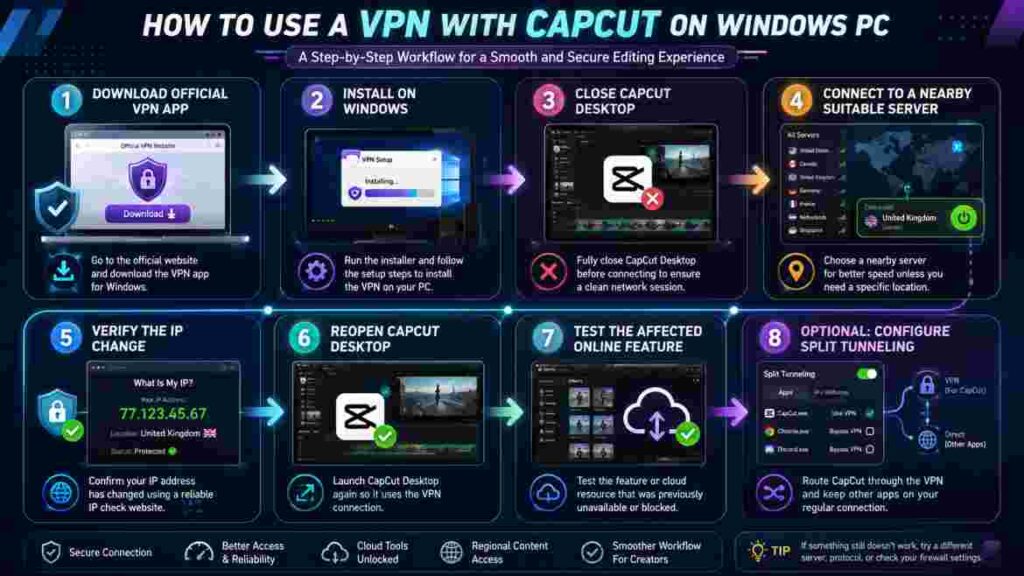
Step 1: Download the VPN from the official source
Go directly to the provider’s official Windows download page.
Do not search for:
- cracked VPN APKs for PC;
- “premium unlocked” VPN installers;
- modified CapCut bundles;
- unknown software mirrors;
- Telegram download packages.
A legitimate VPN should improve your connection security, not introduce questionable executables onto your editing machine.
Step 2: Install the Windows desktop application
Use the provider’s full Windows application.
CapCut Desktop itself officially supports Windows 10 or later, with Windows 10/11 64-bit recommended for current use.
If you use an ARM-based Windows laptop, confirm that your VPN supports ARM64 before installing.
Proton, ExpressVPN, and Windscribe all currently document ARM-oriented Windows options.
Step 3: Close CapCut before changing location
For troubleshooting, it is cleaner to close CapCut completely before connecting.
Why?
Applications can retain:
- active network sessions;
- cached resources;
- authentication state;
- server connections;
- account-session information.
Connecting first and then reopening CapCut gives you a cleaner test.
Step 4: Connect to a nearby suitable location
Do not automatically choose the United States.
Start with a suitable server that is geographically close unless you have a genuine reason to use another country.
Distance usually increases latency.
If the target CapCut function is specifically known to be available in a certain region, then a relevant location may be worth testing, subject to local laws and service terms.
Step 5: Confirm the VPN is connected
Most VPN applications display:
- connection status;
- new IP;
- selected location;
- protocol;
- connection duration.
You can also use a reputable IP-check service in your browser to confirm that your public IP has changed.
Step 6: Open CapCut Desktop
Now launch CapCut normally.
Do not change five settings at once.
Test the exact feature that previously failed.
For example:
- log in;
- load an online effect;
- open the AI feature;
- sync the project;
- access the cloud resource.
If it works, you have evidence that the network path or apparent region may have been involved.
If you are using an experimental version of the editor, check our CapCut Beta guide to understand how Beta builds differ from stable releases and why certain features or connection behavior may be less predictable.
Step 7: If it fails, try one different VPN server
One server failure does not necessarily mean the entire VPN is incompatible.
Reconnect to another nearby endpoint and restart CapCut.
But do not spend an hour hopping through 30 countries.
If several reasonable servers produce the same result, the problem may not be the VPN.
Step 8: Try another protocol
If the provider supports multiple protocols, a different one may behave better on your network.
Examples include:
- WireGuard
- NordLynx
- Lightway
- OpenVPN UDP
- OpenVPN TCP
- Stealth-style modes
TCP-oriented or obfuscated modes may help on some restrictive networks, while modern UDP-based protocols are often preferred for ordinary performance.
Step 9: Consider split tunneling
If CapCut needs the VPN but the rest of your Windows applications do not, configure split tunneling.
A simple creator setup might look like:
Through VPN
- CapCut.exe
Outside VPN
- banking
- local services
- gaming
- region-sensitive business tools
The exact executable and options differ by provider.
Step 10: Keep the configuration simple
Once the best VPN for CapCut PC works, do not over-optimize it.
If the connection is stable, your online resources load, and the VPN does not interfere with other software, you have achieved the goal.
More settings do not automatically mean better performance.
Windows VPN App vs Browser Extension for CapCut
For CapCut Desktop, use the provider’s Windows VPN application unless you have a specific reason not to.
A browser extension is primarily designed around browser traffic or browser-integrated control, depending on the provider.
CapCut Desktop is its own Windows process.
A full VPN application is therefore the more logical choice when the issue involves CapCut itself.
This is one reason our best VPN for CapCut PC shortlist focuses heavily on native Windows clients.
If you only use CapCut Web, the decision can differ because your editing session runs inside the browser.
For the installed CapCut desktop editor, start with the Windows VPN app.
Which VPN Server Location Should You Use for CapCut PC?
One of the most repeated VPN myths is:
“Always connect to the USA.”
That is not good general advice.
The best VPN for CapCut PC does not have one universally correct server country.
Start with the nearest appropriate server
If your objective is privacy or bypassing a restrictive local Wi-Fi network, a nearby VPN location is normally a sensible first choice.
Shorter geographic routes often mean lower latency.
Use another region only when there is a reason
A different location may be appropriate when:
- a CapCut feature explicitly has geographical availability;
- you are traveling and accessing a service associated with your normal home region;
- your current VPN route is unreliable;
- you are troubleshooting whether region affects a feature.
Do not repeatedly change continents because one random tutorial recommends it.
Why the United States is not automatically fastest
Imagine a user in London.
A UK or nearby European VPN endpoint may be much closer than Los Angeles.
Similarly, a creator in Sydney would generally add enormous physical distance by routing all CapCut traffic through New York.
Distance does not guarantee poor performance, but it is an obvious factor.
Keep account behavior in mind
IP address may be only one location signal.
App-store region, account information, platform, feature rollout, and device state can also influence what you see.
CapCut’s support material explicitly notes cases where regional availability, app version, and platform affect effects or templates.
Changing the VPN country therefore does not guarantee a particular feature.
Best practice
Choose the nearest legitimate server that solves the actual problem.
That is better than choosing the most famous flag in the VPN app.
CapCut PC Not Working With a VPN? Try These Fixes
Installing the best VPN for CapCut PC does not guarantee that CapCut will immediately work.
In fact, CapCut’s own troubleshooting documentation notes that VPNs, DNS filters, or blockers can sometimes interfere with connectivity.
If CapCut still fails, troubleshoot systematically.

1. Test CapCut without the VPN
This should be your first comparison.
Disconnect the VPN.
Fully close CapCut.
Reopen it and test the same feature.
Three results are possible:
Works without VPN, fails with VPN:
The VPN configuration, server, protocol, DNS behavior, or VPN IP may be causing the problem.
Fails without VPN, works with VPN:
Routing, location, network restriction, or ISP path may be involved.
Fails both ways:
Stop assuming the VPN is the main problem.
2. Confirm normal internet access
Open other services.
Test a browser.
Load several unrelated websites.
If your entire PC is offline, CapCut is not the first thing to troubleshoot.
3. Restart CapCut after connecting
Do not just minimize and restore the editor.
Close it completely and reopen it after the VPN connection is established.
This refreshes network sessions.
4. Change the VPN server
The current server could be:
- congested;
- temporarily unavailable;
- poorly routed from your ISP;
- blocked by the target service.
Try another server in the same region first.
5. Change protocol
A different protocol may work better with your network.
Try the provider’s automatic/recommended mode first, then one sensible alternative.
Avoid random protocol switching unless you are troubleshooting a specific failure.
6. Review split tunneling
This is a frequent source of confusion.
Suppose you configured your VPN to bypass CapCut months ago and forgot about it.
You may think CapCut is using the VPN when it is actually connecting directly.
Check whether CapCut appears in your:
- excluded-app list;
- included-app list;
- bypass rules;
- route-via-VPN rules.
Different providers phrase these controls differently.
7. Check Windows Firewall and security software
A firewall, antivirus product, endpoint-security tool, DNS filter, or parental-control system may block CapCut or the VPN.
Do not permanently disable security software simply to make an editor work.
Instead, identify whether it is responsible and configure an appropriate rule where safe.
CapCut itself recommends checking whether firewall or antivirus software is blocking desktop connectivity.
8. Update CapCut
Outdated desktop builds can cause compatibility problems.
CapCut recommends using the latest version because older builds may contain defects and may not support newer features or backend changes.
Before major updates, make sure important local project data is protected.
9. Log out and back in
Session tokens can expire or become inconsistent.
CapCut recommends reauthentication as part of its connection troubleshooting process.
If login itself fails, test without the VPN as well. CapCut notes that VPN use can sometimes interfere with sign-in.
10. Test another network
A mobile hotspot is an excellent diagnostic tool.
If CapCut fails on home Wi-Fi but works immediately through your phone’s hotspot, your local network, router, ISP route, DNS configuration, or firewall becomes more suspicious.
If it fails everywhere, look more closely at CapCut itself.
11. Check whether the feature is actually supported on PC
This is critical for templates.
CapCut’s documentation notes that some templates may be mobile-only or otherwise unsupported in a particular desktop setup.
A VPN cannot make an unsupported desktop workflow become supported.
12. Check whether the feature was removed
Effects and AI resources can change.
CapCut says AI effects and templates may disappear because of content updates, licensing changes, or platform-specific optimization.
If an effect was removed from CapCut’s servers, connecting through five different VPN countries will not necessarily bring it back.
13. Check your AI credits
If the message is about insufficient credits, fix the credit issue.
Do not troubleshoot the VPN.
CapCut uses credits for certain AI operations and may prompt users to buy more or subscribe when the balance is insufficient.
14. Check feature rollout
Some new functions are gradually released.
CapCut’s AI Video Maker documentation specifically says that the desktop feature may still be in staged testing and therefore may not appear for every user.
The best VPN for CapCut PC cannot force a server-side feature flag onto an account that has not received it.
15. Disable the VPN if CapCut reports no internet
This may sound contradictory in an article about VPNs, but it is important.
CapCut explicitly advises users to test with VPNs disabled when troubleshooting certain connection errors because a VPN or DNS filter can interfere with access.
A trustworthy commercial guide should tell you when not to use the product category it is discussing.
16. Contact CapCut Support
If you have:
- updated the app;
- confirmed working internet;
- tested VPN on/off;
- tested another network;
- verified your account;
- ruled out credits;
- confirmed platform support;
then collect your Windows version, CapCut version, error message, screenshots, and reproduction steps and contact official support.
That is more useful than endlessly changing IP addresses.
Does a VPN Make CapCut Slower?
It can affect network speed.
Every VPN adds routing and encryption overhead.
The impact may be small or noticeable depending on:
- server distance;
- VPN protocol;
- server load;
- ISP;
- Wi-Fi quality;
- original broadband speed;
- local congestion.
Proton explicitly notes that a VPN connection may be somewhat slower than the direct connection and identifies factors such as server load and distance.
For ordinary timeline editing with local media, you may notice little difference because much of the editing work is happening on your PC.
For cloud-heavy tasks, slower network performance is more visible.
If CapCut becomes noticeably slower through a VPN:
- choose a closer server;
- try the recommended fast protocol;
- test another endpoint;
- disable unnecessary multi-hop features;
- compare the same action without the VPN.
The best VPN for CapCut PC is one that solves the access problem without creating a worse performance problem.
Is It Safe to Use a VPN With CapCut?
Using reputable VPN software on Windows is a normal privacy and networking practice.
The bigger risks usually come from where you get the software and what you expect it to do.
Download official software
Use:
- the VPN provider’s official website;
- Microsoft Store where officially supported;
- CapCut’s official website or legitimate app distribution channel.
CapCut’s own Windows download guidance recommends obtaining the desktop software through official channels.
Avoid modified installers
Be cautious with pages offering:
- CapCut Pro cracked;
- VPN premium cracked;
- unlimited AI credits hack;
- region unlock patch;
- modified executable;
- activation bypass.
These downloads may expose your creator PC to malicious software, credential theft, bundled adware, or corrupted projects.
Understand the legal and terms issue
VPN use itself is legal in many jurisdictions, but laws vary.
The fact that a VPN can technically change your apparent location does not mean every use is permitted under:
- local law;
- employer policy;
- school policy;
- CapCut’s terms;
- third-party service terms.
Use the best VPN for CapCut PC for legitimate privacy, secure networking, travel, and permitted access purposes.
Public Wi-Fi is a separate reason to use a VPN
Creators often work in:
- cafés;
- airports;
- hotels;
- coworking spaces;
- universities.
A reputable VPN can encrypt traffic between your PC and the VPN server, adding useful protection on untrusted networks.
That benefit exists regardless of CapCut.

Which Best VPN for CapCut PC Option Should You Choose?
We can now turn the entire guide into a simple decision.
Choose NordVPN if…
Choose NordVPN if you want a reliable paid Windows VPN and expect to use it regularly.
It provides the strongest overall balance in this comparison for a dedicated desktop creator.
Best for: regular Windows creators who want a paid all-rounder.
Choose Proton VPN if…
Use Proton VPN Free if you:
- want to spend nothing;
- need unlimited free data;
- want to test whether a VPN solves your CapCut issue;
- do not require unrestricted free country selection.
For many readers, this is the smartest first step.
Best for: free users and diagnosis.
Choose Surfshark if…
Surfshark is the better fit when one subscription must cover a large number of devices.
If you edit on Windows, shoot on two phones, own tablets, share devices with family, and use the VPN throughout your digital life, unlimited simultaneous connections are valuable.
Best for: multi-device creators.
Choose ExpressVPN if…
Choose ExpressVPN when you value a premium Windows client and its Lightway ecosystem enough to accept a higher value threshold.
Best for: users who prioritize polished premium software over finding the cheapest solution.
Choose Windscribe if…
Choose Windscribe if you want a capable free Windows app and 10GB per month is enough for your workflow.
Best for: occasional users who want more free-plan flexibility.
Skip paying for a VPN if…
Do not buy anything yet if:
- CapCut works without a VPN;
- your issue is slow local exporting;
- you are missing a mobile-only template;
- you have insufficient AI credits;
- your CapCut Pro subscription has expired;
- your PC hardware is the bottleneck;
- Proton Free already meets your needs.
Pay for a VPN if…
A paid VPN becomes easier to justify if:
- you have confirmed that a VPN resolves the problem;
- you use it daily;
- you need specific locations;
- free servers are limiting your workflow;
- you need many devices;
- VPN privacy matters outside CapCut as well.
That is the most rational way to choose the best VPN for CapCut PC.
Final Verdict: What Is the Best VPN for CapCut PC?
The best VPN for CapCut PC for most people who want a paid service is NordVPN. It combines a mature Windows client, NordLynx, application-level traffic controls, a broad server network, and enough simultaneous connections for a typical creator setup.
For users who want a free VPN for CapCut PC, Proton VPN is the stronger first choice because its Free plan currently has unlimited data and no artificial speed limit. That makes it particularly useful for determining whether a VPN actually solves your CapCut problem before you spend anything.
Choose Surfshark when unlimited device connections add real value to your creator workflow. Choose ExpressVPN when you are willing to pay for a more premium Windows experience. Choose Windscribe when you want another capable free service and 10GB per month is sufficient.
More importantly, do not assume that every CapCut problem needs a VPN.
A VPN may help with a region-dependent feature, restrictive network, unusual internet route, or privacy concern. It will not upgrade CapCut Pro, create AI credits, add unsupported mobile templates to Windows, repair a corrupted project, or make a weak GPU export videos faster.
That distinction is what should ultimately determine your purchase.
The best VPN for CapCut PC is not the VPN with the biggest advertisement, the longest feature list, or the highest price.
It is the VPN that solves a genuine network problem without creating a new one.